The best to-do list apps in 2026, sorted by who keeps the list
The best to-do list apps in 2026, from Todoist and TickTick to Motion and the free apps on your phone, sorted by who does the upkeep.
Sep 19, 2026
If you only have a minute, here's where we landed. The best to-do list app for most people is still Todoist, the best value is TickTick and if you'd rather not pay anything the app already sitting on your phone has quietly become pretty good. And if what wears you out isn't the work itself but keeping the list of it up to date, there's a newer kind of app for that too, which we'll get to at the end.
We should admit something before we start. We make a to-do app, so we've spent an unreasonable amount of time inside everyone else's. What struck us is that nearly every roundup sorts these apps the same way, by features or by which devices they run on, when the question that actually decides whether you'll still be using one in March is much simpler. Who keeps the list true? With most apps the answer is you, every morning, forever. Some ask almost nothing of you because they're already on your phone. Some take what you give them and plan your calendar around it. And a few are starting to do the keeping themselves. Figure out which of those you want and the rest of the choice mostly makes itself.
The best to-do list apps at a glance
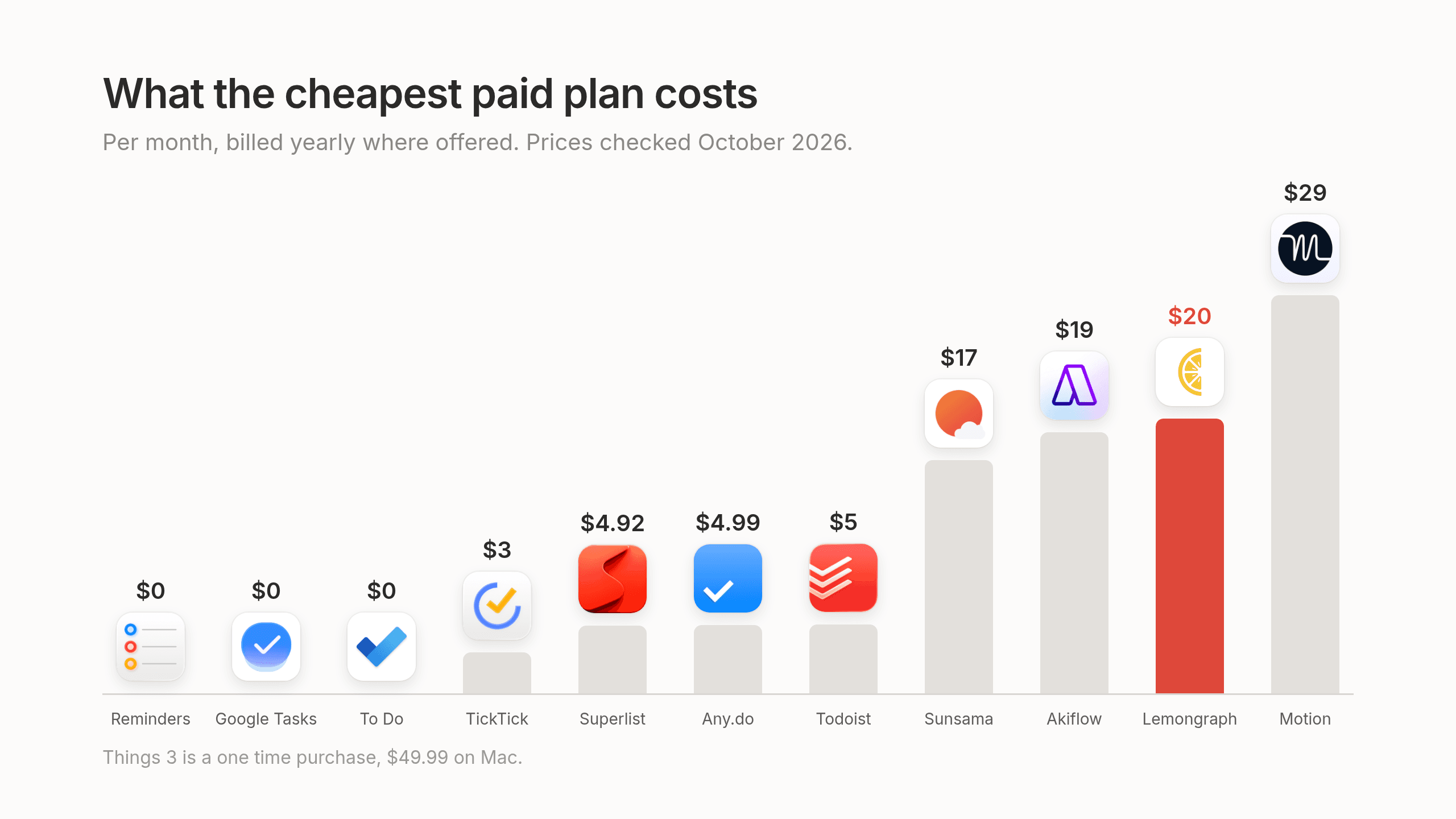
Prices checked October 2026.
| App | Best for | Who keeps the list | Free plan | Paid price | Platforms |
|---|---|---|---|---|---|
| Todoist | Most people | You | Yes | Pro $7 a month or $60 a year | Web, Mac, Windows, Linux, iOS, Android |
| TickTick | Value, all in one | You | Yes | Premium $3.99 a month or $35.99 a year | Web, Mac, Windows, iOS, Android |
| Things 3 | Apple users who care about design | You | No | One time, $49.99 Mac, $19.99 iPad, $9.99 iPhone | Mac, iPad, iPhone |
| Any.do | People who forget to open their to-do app | You | Yes | Premium $7.99 a month or $4.99 a month billed yearly | Web, desktop, iOS, Android |
| Superlist | Tasks and notes together | You | Yes | Basic $6 a month, Super $25 a month | Web, Mac, iOS, Android |
| Apple Reminders | Free on iPhone and Mac | You | Free | $0 | Apple devices |
| Microsoft To Do | Free for Outlook users | You | Free | $0 | Web, Windows, Mac, iOS, Android |
| Google Tasks | Free for Gmail users | You | Free | $0 | Web, iOS, Android, inside Gmail and Calendar |
| Motion | Having your calendar planned for you | You add tasks, it schedules them | No, 7 day trial | Pro AI $49 a month or $29 billed yearly | Web, Mac, Windows, iOS, Android |
| Akiflow | One inbox for tasks from many tools | You collect and plan by hand | No, 7 day trial | Pro about $19 a month billed yearly | Web, Mac, Windows, iOS, Android |
| Sunsama | A calm daily planning routine | You, through a daily ritual | No | Pro $22 a month or $17 billed yearly | Web, Mac, Windows, iOS, Android |
| Lemongraph | Not maintaining a list at all | The list keeps itself | Yes | Pro $20 a month | Web, Mac |
How we picked
We'd love to tell you we built an elaborate scoring system, but we didn't. We're a little suspicious of lists that claim to have one. What we did was think about an ordinary Tuesday. How quickly can you get a thought out of your head before it evaporates? Does the app help you decide what to do this morning or does it just hold everything at equal volume? How much tending does it ask of you each week and what does it really cost once the trial ends and the card gets charged?
We kept the apps that turn up in nearly every serious roundup and added the newer planners people have been drifting toward this year. Prices come from each company's own pages or from current pricing records. We checked all of them in October 2026, though prices do have a habit of moving when nobody's looking.
Lists you keep yourself
These are the classic to-do apps and the good ones are genuinely lovely to use. They give you a calm place to write things down and the small joy of checking them off. The catch is that the list only knows what you've told it, so it's exactly as current as the last time you sat down and updated it.
Todoist
Todoist has been the sensible answer to "which to-do app should I use" for the better part of a decade and it keeps earning it. The magic is in Smart Quick Add, which understands the way you'd actually say a task out loud. You type "send the deck to Maria Thursday at 3pm #Clients" and it quietly sorts out the date, the time and the project for you, which is why so many people consider it the best natural language input around. Todoist Assist layers a few AI tools on top. Ramble lets you talk through your day and turns it into tasks and Email Assist pulls action items out of emails you forward to it.
It also grows with you better than most personal apps, with a real team plan and a long list of integrations for when your list stops being only yours.
Best for most people who want one dependable list that follows them everywhere.
Not ideal if you want a habit tracker or focus timer built in, or you'd like a calendar view without paying for it, since calendar layout lives in Pro.
Price The free Beginner plan gives you 5 active projects, 3 filter views, basic reminders and 7 days of activity history. Pro is $7 a month or $60 a year, which works out to $5 a month. Business is $10 per user a month or $8 billed yearly. Our Todoist pricing guide walks through every limit if you want the fine print.
Platforms Web, Mac, Windows, Linux, iOS, Android, watches and browser extensions.
TickTick
TickTick feels like a to-do app that kept saying yes to good ideas. Even on the free plan you get a habit tracker, a Pomodoro focus timer tied to your tasks, an Eisenhower matrix for sorting what's urgent from what only feels urgent and basic calendar views. In January 2026 version 8.0 added Suggested Tasks, which nudges unfinished work toward today. Reviewers call its AI modest and we think that's fair, though modest isn't always a bad thing.
Premium opens up full calendar views with drag and drop scheduling, statistics and much roomier limits, all for about the price of one fancy coffee a month.
Best for people who want the most for the least and like having their tasks, calendar and habits under one roof.
Not ideal if you type tasks in plain language all day, since its input isn't as clever as Todoist's, or if you work closely with a team, because collaboration is light and there's no team plan.
Price Free, or Premium at $3.99 a month or $35.99 a year. Our TickTick pricing guide has the details. If you're stuck between these first two, we wrote a whole Todoist vs TickTick comparison just for you.
Platforms Web, Mac, Windows, iOS, Android and Apple Watch.
Things 3
Opening Things feels a bit like walking into a room someone tidied just before you arrived. Every margin seems considered, the animations are gentle and nothing is shouting for your attention. People who love it tend to love it for years and it's one of the few apps here you buy once instead of renting forever.
Best for people who live on Apple devices and care how their tools feel. For plenty of them it's simply the best to-do list app for Mac.
Not ideal if there's a Windows laptop or Android phone anywhere in your life, if you'd like to share a list with someone or if you like your apps to change often. Reviewers point out it hasn't had a major update in a long while.
Price No free plan. A one time purchase of $49.99 on Mac, $19.99 on iPad and $9.99 on iPhone, each bought separately.
Platforms Mac, iPad and iPhone.
Any.do
Any.do seems designed for a very relatable person, the one whose to-do app sits unopened in a corner of their phone. Its Plan my Day flow gently walks you through what's coming and its reminders are good at tapping you on the shoulder. It also works with AI tools like ChatGPT and Claude, which is handy if a chat window is already where your day happens.
Best for people who mean to check their list and then don't.
Not ideal if price matters most, since Premium billed monthly costs about twice what TickTick does.
Price The Personal plan is free. Premium is $7.99 a month or $4.99 a month billed yearly. There are Family and Teams plans too.
Platforms Web, desktop, iOS and Android.
Superlist
Superlist works from a simple observation that we happen to agree with, which is that tasks and the thinking around them usually belong together. You can write out a project brief and keep its tasks right inside it, rather than leaving your thoughts in one app and your checkboxes in another.
Best for people who think in notes and want their tasks to live next to them.
Not ideal if you like to see your week laid out on a calendar, because there's no calendar view of tasks.
Price Free for up to 5 private and 5 shared lists, with unlimited tasks and notes. Basic is $6 a month or $59 a year and adds unlimited lists, AI voice input and integrations with tools like Gmail and Linear. Super is $25 a month or $249 a year and adds AI meeting notes and turns email into tasks.
Platforms Web, Mac, iOS and Android.
Free apps already on your phone
Before you pay anyone anything, including us, it's worth giving these a real try. They spent years being the app you deleted first, but they've grown up a lot and for a simple personal list they may be all you ever need.
Apple Reminders
If you have an iPhone, the best free to-do list app might already be on your home screen, patiently waiting. Reminders has become quietly capable over the years, with Smart Lists, tags, subtasks, reminders that pop up when you arrive somewhere and grocery lists that sort themselves into aisles, which still feels a little like a magic trick.
Best for iPhone and Mac users who want something free that just works.
Not ideal if you ever plan to leave Apple's world, or if you're running real projects, where it starts to feel thin.
Price Free. Platforms Apple devices only.
Microsoft To Do
Microsoft To Do is clean and unfussy and it's happiest when your work already runs through Outlook. Its My Day view hands you a fresh, empty list every morning, which is a nice little ritual. Emails you flag in Outlook can show up as tasks without you lifting a finger.
Best for Outlook people who want a simple daily list for free.
Not ideal if you need much power. It's fairly basic and reviewers say its AI hasn't kept up.
Price Free. Platforms Web, Windows, Mac, iOS and Android.
Google Tasks
Google Tasks lives in the side panel of Gmail and Google Calendar, so your list sits right beside your inbox and you never have to open another tab to remember what you promised.
Best for Gmail and Google Calendar users who want the simplest list possible.
Not ideal if you want anything beyond a plain list. It's very basic, on purpose.
Price Free. Platforms Web, iOS and Android, plus inside Gmail and Google Calendar.
Planners that schedule your day
These apps start from a different worry. You know perfectly well what's on your list, but somehow there's never time to do any of it. So instead of holding your tasks, they try to find them a home on your calendar.
Motion
Motion is the most hands-off of the planners. You hand it your tasks and deadlines and it fits them into your calendar around your meetings, then reshuffles everything when the day inevitably goes sideways. It comes up a lot when people search for the best AI task manager. For scheduling that reputation is well earned.
Best for people who'd love to stop deciding when to do things.
Not ideal if you're watching your budget, or if a fully scheduled day feels less like a plan and more like a cage. Some people find it hard to stick to.
Price No free plan, only a 7 day trial. For individuals, Pro AI is $49 a month or $29 a month billed yearly and Business AI is $69 a month or $39 billed yearly.
Platforms Web, Mac, Windows, iOS and Android.
Akiflow
Akiflow is built around one inbox for everything. It pulls tasks in from your email and other tools and then you drag them onto your calendar with keyboard shortcuts that feel genuinely fast. If your work is scattered across five apps, it's a relief to see it all in one place.
Best for people with tasks in too many places who like to block time for them.
Not ideal if you're hoping the planning will happen for you. You still decide what goes where, by hand.
Price No free plan. The 7 day trial needs a card upfront. Pro is about $19 a month billed yearly.
Platforms Web, Mac, Windows, iOS and Android.
Sunsama
Sunsama feels less like a productivity tool and more like a kind friend who asks how your day's looking before you dive in. Each morning it walks you through planning something realistic and each evening it helps you close the day out. It's built, quite deliberately, to stop you from promising yourself ten hours of work in a six hour day.
Best for people who want a calm routine and a gentle push to log off on time.
Not ideal if your mornings are already a sprint, because the ritual takes real time every day. It's also a lot to pay for a personal planner.
Price No free plan. Pro is $22 a month or $17 a month billed yearly.
Platforms Web, Mac, Windows, iOS and Android.
What all of these apps have in common
Look back over every app above and you'll notice one thing never changes. You're still the one keeping the list true. You fish tasks out of your inbox and your meetings, you decide what matters most and you rearrange everything when Tuesday falls apart. Even the planners can only schedule what's already on the list. Somebody still had to put it there.
For lots of people that's completely fine. Some of us genuinely enjoy it, the way some people find folding laundry relaxing. But if most of your to-dos come from other people, a client's email here, a promise you made as a call was wrapping up there, keeping the list current slowly becomes a second job that nobody hired you for.
If you'd rather not maintain a list at all
Lemongraph
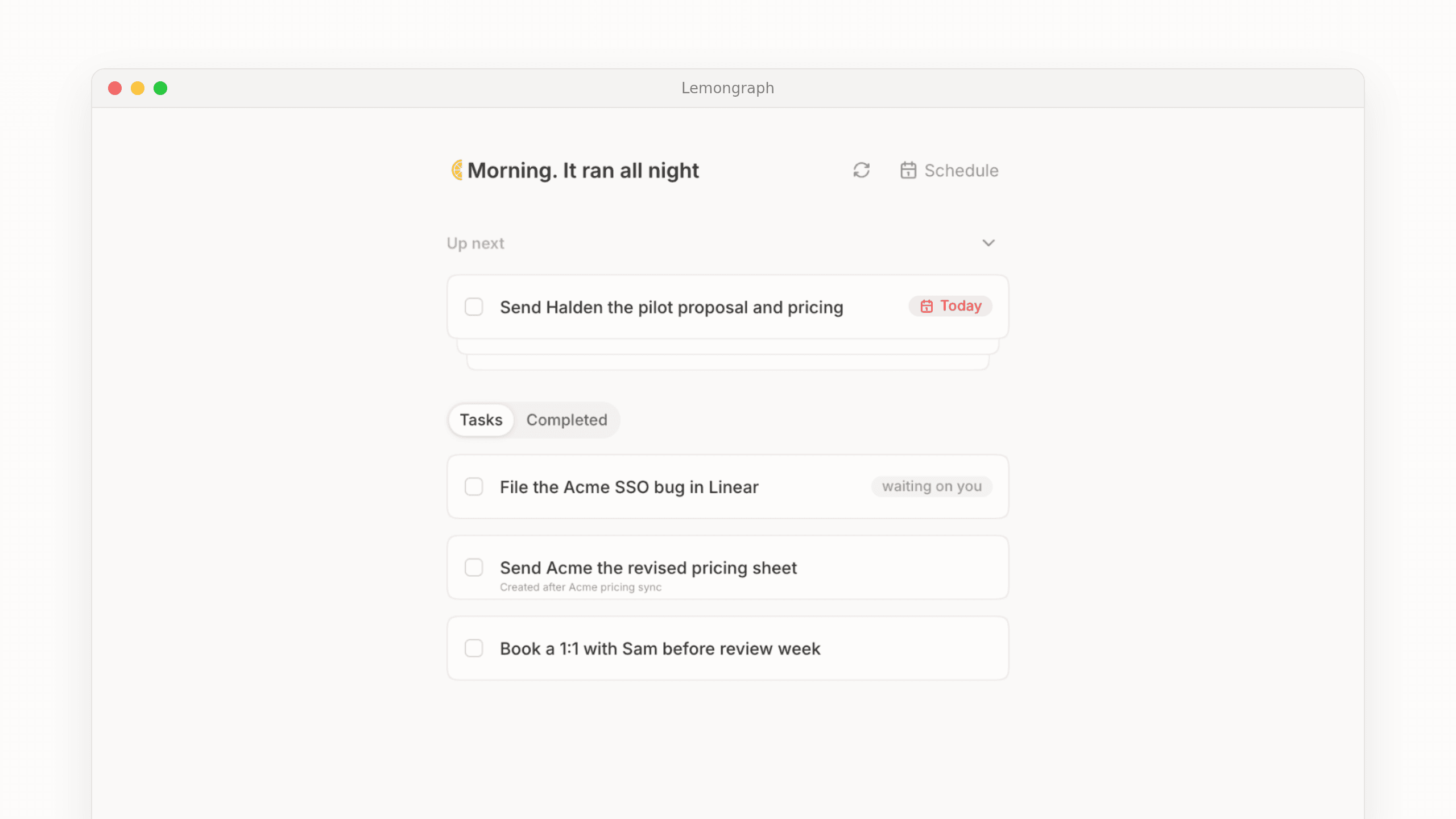
To be upfront, Lemongraph is ours and it's newer than everything else on this page. We built it as an AI native personal task manager for people whose work runs through other people, like founders, managers and consultants who are tired of being the clerk of their own to-do list.
The idea is that the list keeps itself up to date. Tasks arrive from your email and meetings without you copying them over, priorities shift when plans change and every morning Up next shows what matters today and why. You can snooze anything and it'll come back when you're ready. Anything it does on your behalf starts as "Ask first" until you're comfortable letting it go ahead. It connects with Gmail, Google Calendar, Linear, Asana, ClickUp, monday.com, Notion, Attio, HubSpot, Calendly and Cal.com.
Best for people who'd rather spend the morning doing the work than tidying the list of it.
Not ideal if you enjoy running your own system, want habits or a focus timer, or need a phone app today. There's no iPhone or Android app yet and it doesn't sync with Todoist or TickTick. We'd rather tell you now than have you find out later.
Price Free gives you 5 integrations and 15 chore runs a month, with daily priority triage and chore spotting included. Pro is $20 a month for unlimited integrations and 100 chore runs. We charge per chore that actually gets done, not by credits, because paying for work that didn't happen never sat right with us. If you're coming from Todoist, our Todoist vs Lemongraph piece goes deeper.
Platforms Web and Mac.
How to choose the best task management app for you
The choice gets a lot easier once you're honest with yourself about how much upkeep you actually want to do.
If you want one solid app that works everywhere, pick Todoist. If you want the most for the least, pick TickTick. If you live on Apple devices and want something beautiful, Things 3 will make you happy. If free and simple is the goal, start with whatever's already built into your phone or your email. If your calendar is the real problem, Motion, Akiflow and Sunsama each take a different swing at it. And if the problem is keeping the list itself up to date, we'd love for you to try Lemongraph.
Whatever you pick, give it two honest weeks before you judge it. The best to-do list app isn't the one with the longest feature list. It's the one you still open on a busy Friday.
Frequently asked questions
What is the best to-do list app?
For most people it's Todoist. Adding tasks in plain language is quick and it runs on nearly every device you own. If you'd like a calendar, habits and a focus timer for less money, TickTick is the best value at $35.99 a year.
What is the best free to-do list app?
The apps already on your devices are hard to beat for free. Apple Reminders suits iPhone and Mac users, Microsoft To Do suits Outlook users and Google Tasks suits anyone who lives in Gmail. If you want something free that works across every platform and includes habits and a timer, TickTick's free plan is unusually generous.
What is the best task management app for personal use?
That depends on whether you think in lists or in calendars. Todoist and Things 3 are lovely if you like keeping your own clean list. Sunsama is a better fit if you'd rather sit down each morning and plan a day you can actually finish.
What is the best to-do list app for Mac?
Things 3 is the favorite for Mac users who want something calm and fast and a one time $49.99 purchase, as long as you don't need to share lists. Apple Reminders is a good free option that's already on your Mac.
Is there an AI to-do list app that actually helps?
Yes, though they help with quite different things. Todoist Assist turns voice notes and forwarded emails into tasks. Motion schedules your calendar around your meetings. Lemongraph keeps the list and its priorities up to date from your email and meetings so you don't have to.
Is there a to-do app that updates the list for me?
That's the reason we built Lemongraph. Tasks arrive from your email and meetings, priorities adjust when plans change and Up next shows you what matters each morning, without you tidying the list by hand.
Should I use a to-do list app or a planner?
Reach for a to-do list app like Todoist or TickTick if your main worry is forgetting things. Reach for a planner like Motion or Sunsama if you already know what's on your list but can't find the hours on your calendar to do it.
How to prioritize tasks at work when everything feels urgent
How to prioritize tasks when everything feels urgent. Five practical steps, the classic methods with their real origins and why work needs a new approach.
TickTick pricing in 2026: is it free and is Premium worth it?
Looking for TickTick pricing in 2026? Yes, it has a generous free tier while Premium costs $35.99 a year. See every limit and who should pay.