Meeting action items: how to write them, a free template and how to stop retyping them
What makes a good meeting action item, a real example, a free meeting minutes template with action items and how to stop retyping them after every call.
Sep 27, 2026
Meeting action items are the specific tasks a group agrees on before everyone hangs up, each with one owner, a clear next step and a real date. The good ones also carry a line about why they matter, which is the bit most notes leave behind.
You probably know the feeling this guide is about. A call ends, everyone says "great, thanks all" in that slightly relieved way and you're fairly sure you agreed to something. By Thursday you're scrolling back through your notes trying to work out what. Below you'll find what separates a good action item from a hopeful one, an example from a real sounding call and a template you can copy right now. And at the end, an honest look at why even good action items so often go nowhere.
What are action items in a meeting?
Action items are the promises made in the last five minutes of a call, right before everyone goes back to their inbox. Depending on who you work with you'll hear them called action points, next steps, to-dos or follow ups. Whatever the name, they're the bridge between talking about work and actually doing it.
It helps to keep them apart from decisions, because mixing the two up is how things get lost. A decision is a record of what the group agreed, like picking a vendor. An action item is the work that follows from it, like drafting that vendor's contract by Friday. One looks back and the other looks forward.
We're also having far more of these conversations than we used to. Microsoft's 2023 Work Trend Index, which surveyed 31,000 workers, found that the average person attends about three times as many Teams meetings and calls each week as they did in February 2020, an increase of 192 percent. Inefficient meetings came out as the number one distraction at work. And 55 percent of people said the action items after a meeting are unclear. More meetings means more promises. Apparently a lot of them leave the call already a little blurry.
We think that matters more than it sounds. An action item isn't really a line in a document. It's a small promise to a person. And most of us are judged, quietly and constantly, on whether we keep those small promises. Nobody remembers the meeting where you sent the deck on time. Everybody remembers the one where you didn't. None of this is complicated, but staying consistent across dozens of calls a week is a surprisingly large part of the work.
What makes a good meeting action item
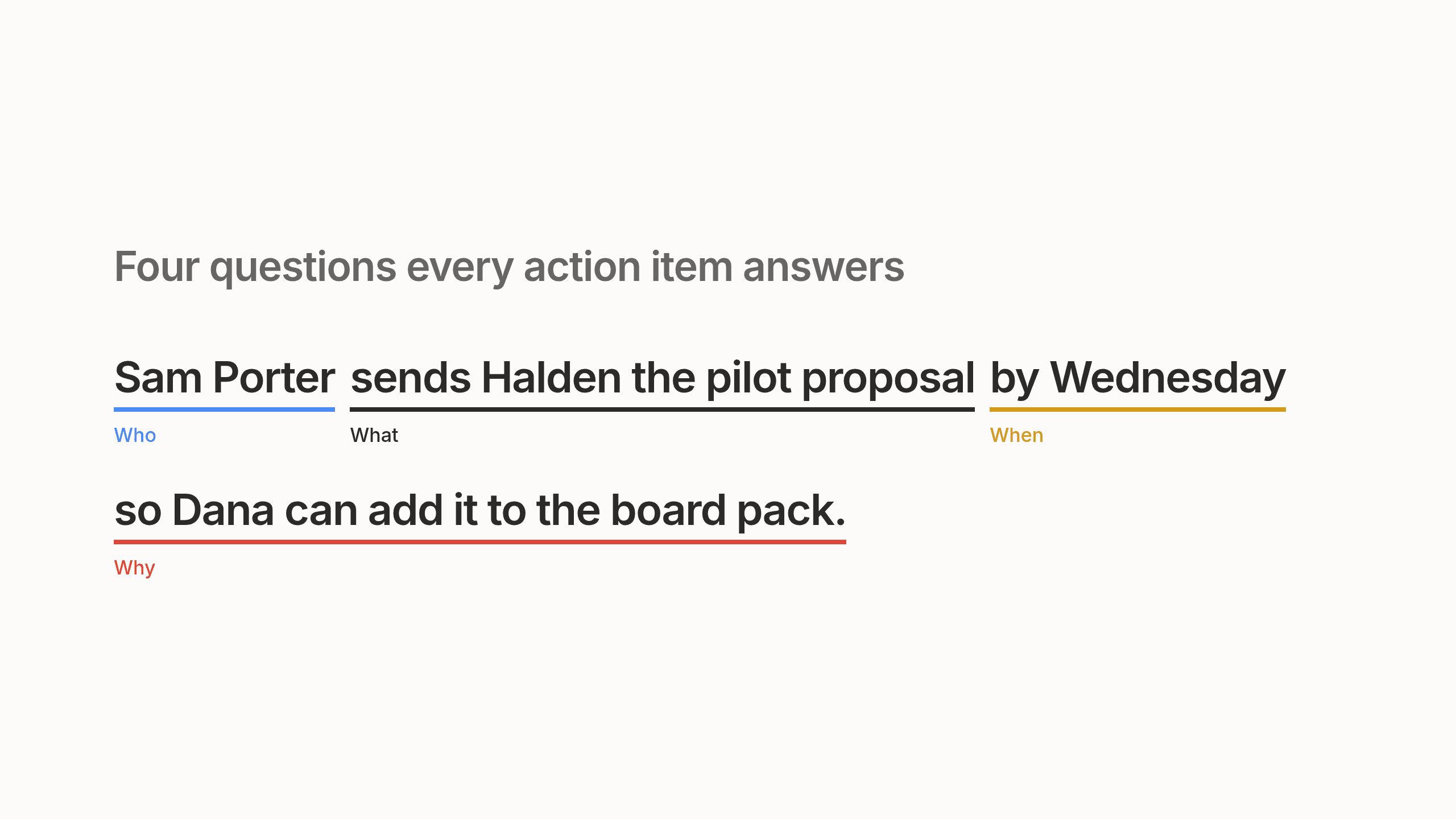
A good action item answers four questions, so the person who owns it can start on Tuesday morning without messaging three colleagues to ask what the note meant.
Who. One named person. Not "the team" and never "we". Plenty of people can help, but if two people own something, in practice nobody does. It's the office version of everyone assuming someone else locked the door.
What. A specific next step that starts with a verb, like draft, send or review. "Look into pricing" isn't an action item, because nobody can tell when it's finished. "Draft per seat pricing for the pilot" gives the owner a real starting line.
When. An actual date. ASAP and soon are moods, not deadlines.
Why. One line of context about which decision it came from and who's waiting on it. This is the line people skip when they're typing fast and it's the one that saves the most back and forth a week later.
And keep the list short. A handful of real commitments will get done. Fifteen vague ones mostly get admired.
A meeting action item example
Rules make more sense when you hear how people actually talk, so here's a moment from a weekly sync between Dana and Sam.
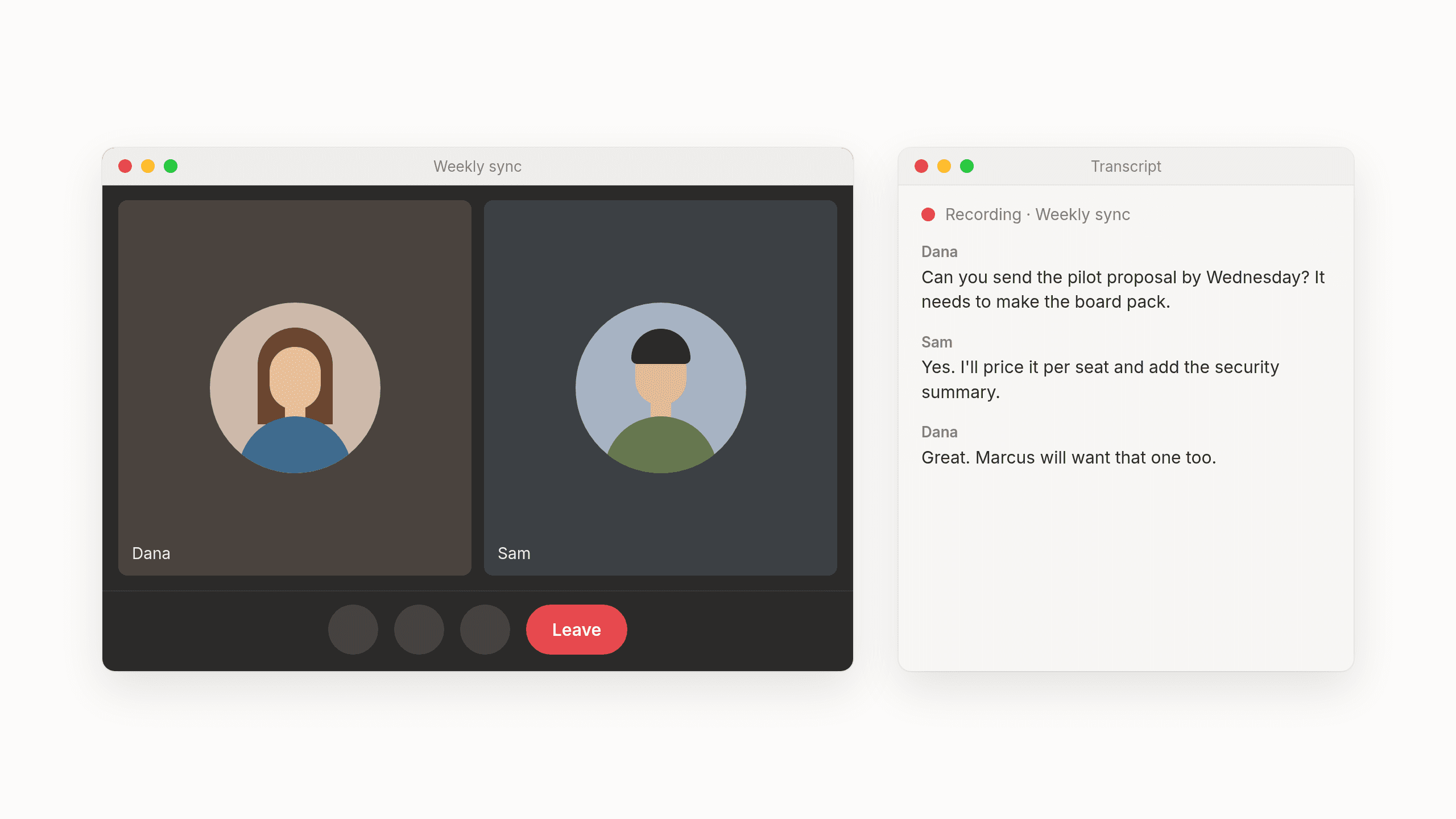
Dana: Can you send the pilot proposal by Wednesday? It needs to make the board pack.
Sam: Yes. I'll price it per seat and add the security summary.
Dana: Great. Marcus will want that one too.
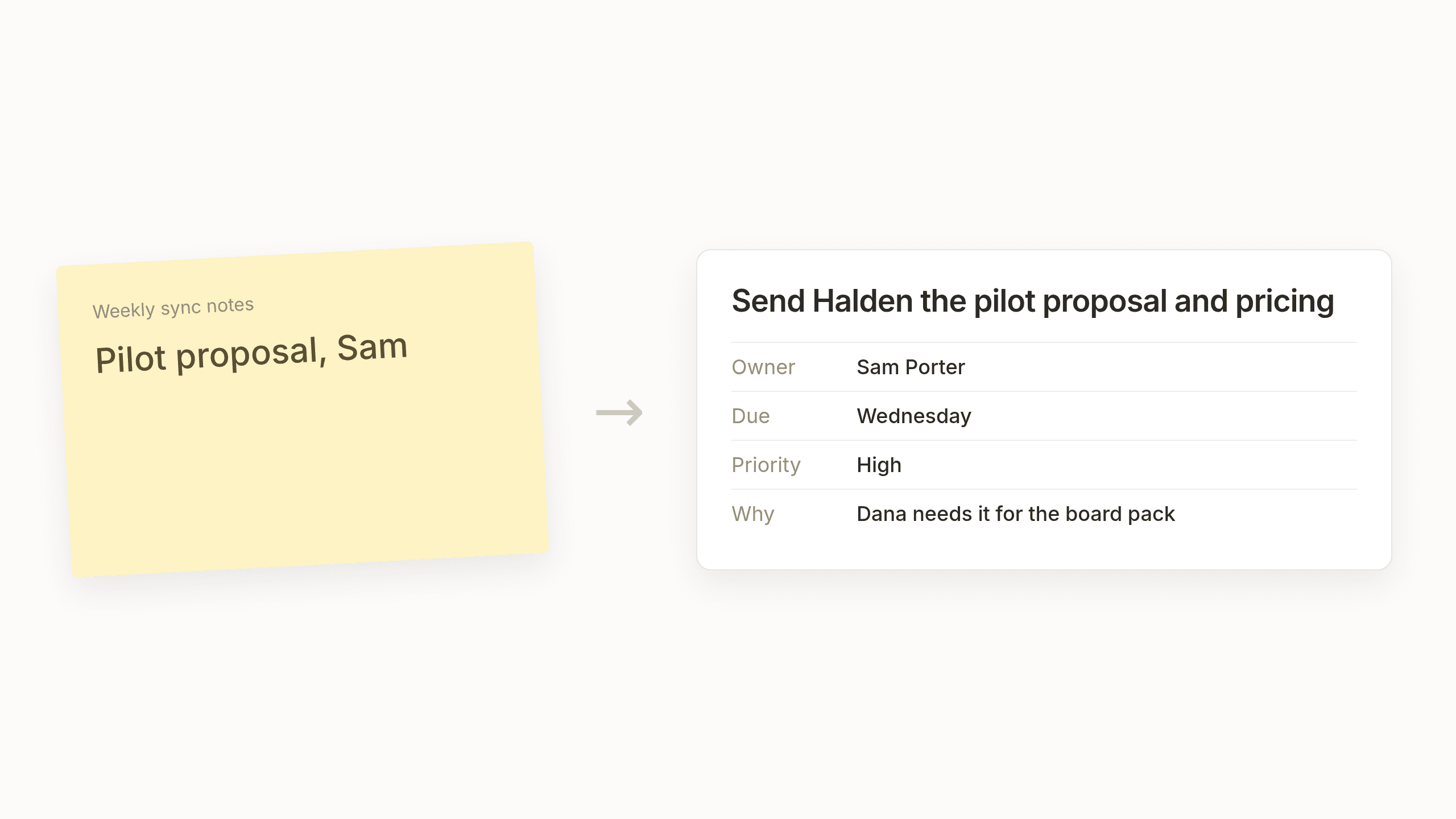
If you're listening and typing at the same time, what usually ends up in the notes is "Pilot proposal, Sam." It feels perfectly clear in the moment. By Thursday afternoon nobody quite remembers whether Sam was drafting it or sending it, who it was for or why Wednesday mattered so much.
Here's the same commitment captured properly.
- Title: Send Halden the pilot proposal and pricing
- Owner: Sam Porter
- Due: Wednesday
- Priority: High
- Context: Per seat pricing and a one page security summary. Dana needs it by Wednesday so it makes the board pack. Marcus will want to see it too.
Notice how much of that lived only in the conversation. The board pack, the security summary and Marcus were never going to survive "Pilot proposal, Sam". Once the call ends, that kind of context evaporates surprisingly fast unless someone catches it on the way out.
Meeting minutes template with action items
If you want a meeting minutes template with action items you can use today, copy the block below. We kept it deliberately plain, no clever formatting and no tables, so it survives being pasted into whatever notes app your team already lives in. Plain things travel well.
Meeting: [Name]
Date: [Day, date]
Attendees: [Names]

Decisions
- [What was agreed]

Action items
- [Verb + specific next step]
  Owner: [One name]
  Due: [Date]
  Why: [Which decision it came from and who is waiting on it]

Parking lot
- [Things raised but not decided]

Next meeting: [Date]
Our one tip is to paste it into the doc before the call starts. Filling it in then becomes part of the meeting instead of homework afterwards. Keeping decisions and action items in separate sections makes the page easy to scan a week later and the parking lot gives side conversations somewhere polite to go without getting lost.
How to include action items in meeting minutes
A template helps, but turning spoken promises into reliable action items mostly comes down to a few small habits. None of them are new. They just work better than they have any right to.
Read the action items out loud before the call ends. It takes a minute and it's the moment someone says "wait, I thought that was Friday" while everyone's still in the room.
Keep the list short. People leave focused on a few real commitments rather than a wall of text they'll never reread.
Send the notes within the hour. The conversation is still fresh and it's before the next round of calls has pushed it out of everyone's head.
Start the next meeting with last week's open items. It's a gentle way to make sure promises don't quietly drop off the radar.
Do all four and your notes will be better than most. We mean that. But we'd be fibbing if we said that was the end of it, because capturing the list is really only half the job.
Why action items die after the meeting
Most guides stop at the template, as if a tidy document gets the work done on its own. In reality even a perfect list of meeting action items is still just a list, sitting in a document nobody's excited to reopen. The other half of the job starts after the call, when someone has to copy each item into the project tracker it belongs in, set the owner and the priority, add the right labels and paste in enough context that it makes sense to whoever opens it next week.
Then there are the small promises that don't belong in any tracker at all. Sending someone an intro, checking in with a client on Friday. Those end up living in your head, which is a lovely place for ideas and a terrible place for promises.
And all that copying tends to happen in the three minutes between back to back calls, which is exactly when nobody has three minutes. So the task gets shortened to "pilot proposal, Sam" and the why disappears all over again. Tools that summarize meetings help, but most of them stop at producing a list. The retyping is still yours.
Action items that land where the work lives
So we started asking a simple question. What if the list didn't wait for you at all and simply landed where the work lives, ready to go? That's a big part of why we built Lemongraph, an AI native personal task manager for people whose work runs through other people, like founders, managers and consultants. When your work lives in conversations, nearly every one of them ends with a promise and Lemongraph picks those up from your email and meetings without you copying anything over.
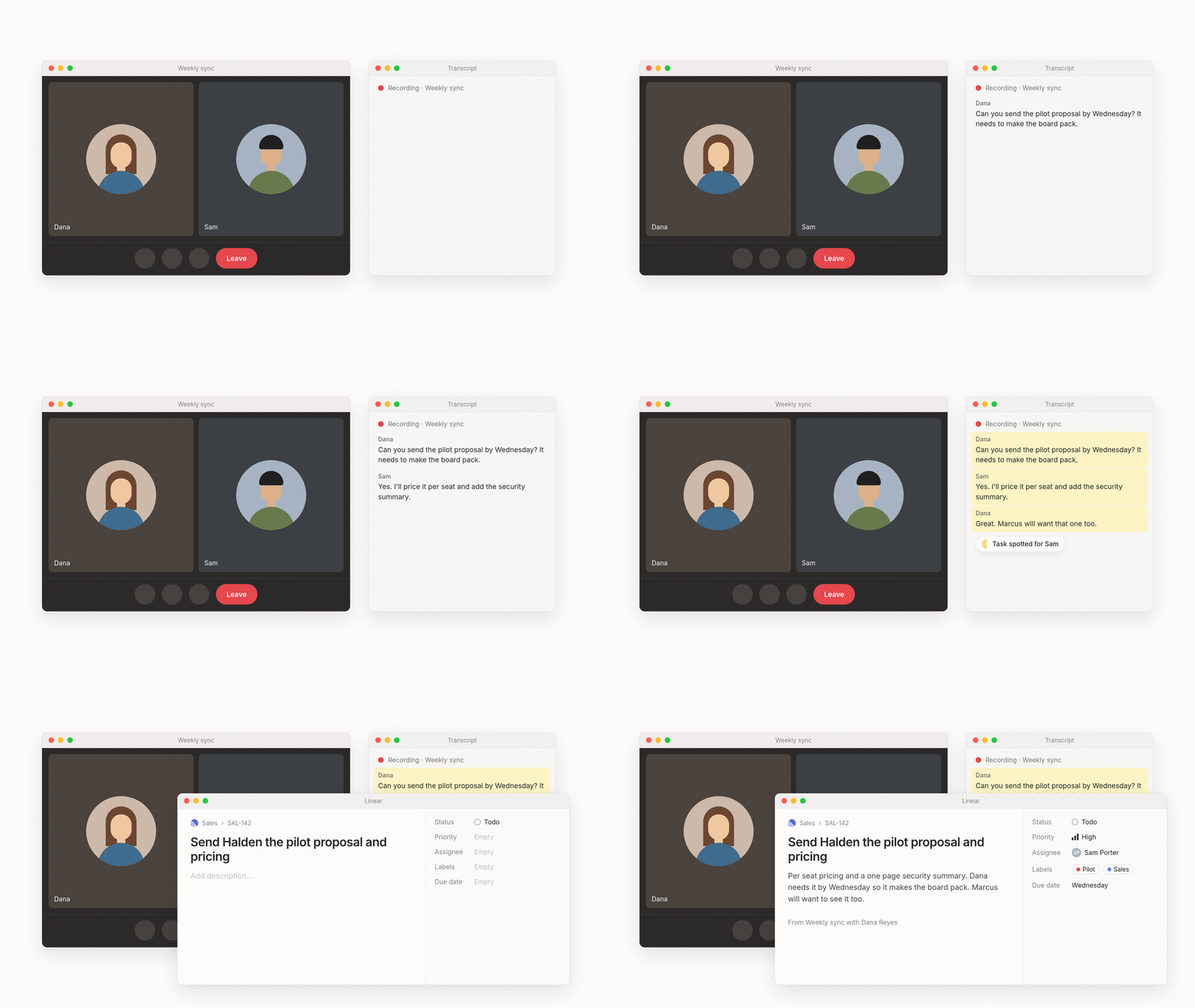
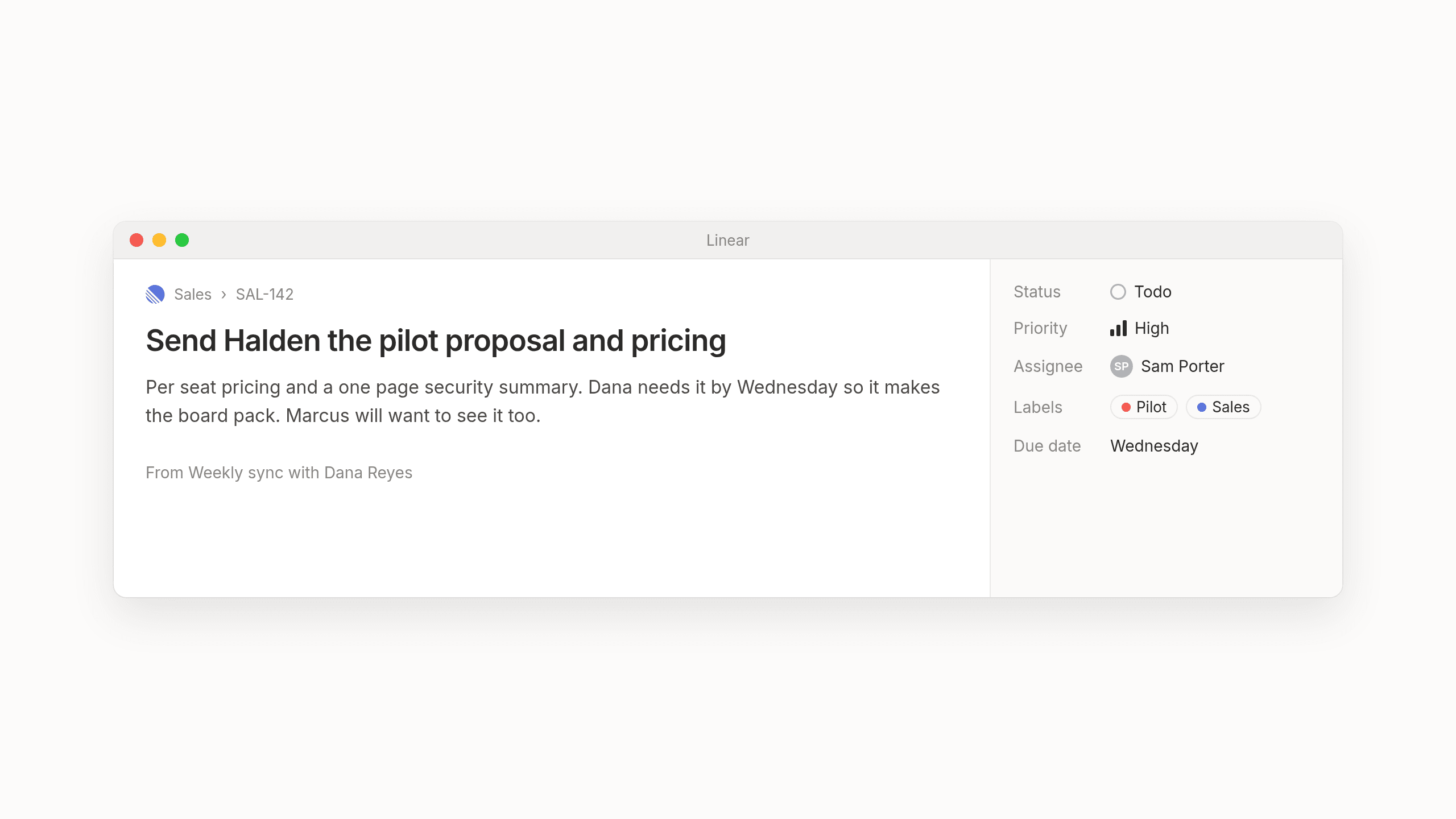
When it creates a task from a meeting in Linear, Asana, ClickUp or monday.com, it works out the owner, the priority and the labels itself, weighing what was said against everything it knows about the work. We'll admit we didn't get this right at first. Early on Lemongraph created the ticket and left the fields blank, which was just one more thing to fix between calls. Now tasks show up ready to go. That Linear issue for Sam, with the owner, the high priority, the Pilot and Sales labels, the Wednesday date and the context about Dana's board pack, is exactly what it creates from that conversation.
Under the hood we keep things deliberately boring. One part only decides whether something said in a meeting should become a task at all. A separate, more predictable system then decides where that task belongs, whether that's Linear, Asana or simply your personal list in Lemongraph. Keeping those two jobs apart is a big part of what makes the results something you can rely on.
The promises that don't belong in a team tracker land in your own list and every morning Up next shows what matters today and why. If you're curious how we think about that ordering, we wrote about it in our guide on how to prioritize tasks. You never have to prompt it and anything it does on your behalf starts as "Ask first" until you're comfortable letting it go ahead.
To be candid, it won't get every owner or priority right every time, which is exactly why it asks first. And if your meetings are short and your action items few, the template above may be all you ever need. If your days are full of back to back calls, Lemongraph runs on the web and Mac, with a free plan that includes 5 integrations and 15 chore runs a month and a Pro plan at $20 a month with 100 chore runs.
Either way, we hope your next meeting ends with fewer "great, thanks all" moments and more promises that actually get kept. The people on the other side of the call will notice, even if they never say so.
Frequently asked questions
What are action items in a meeting?
They're the specific tasks agreed during a meeting that someone needs to do after it ends. Each one should have one named owner, a next step that starts with a verb, a real date and a short line about why it matters.
What is an example of an action item?
Instead of "pricing deck", a good action item reads something like "Send Halden the pilot proposal with per seat pricing and a one page security summary. Owner Sam Porter, due Wednesday, so Dana can include it in the board pack." Anyone reading it knows who, what, when and why.
How do you include action items in meeting minutes?
Give them their own section right below the decisions, so they don't get buried in paragraphs of discussion. Paste a template into the doc before the call, fill in owners and dates as people agree to things and read the list out loud before everyone leaves.
What's another way of saying action items?
Action points and next steps are the most common. You'll also hear to-dos or follow ups, depending on how formal the meeting is. They all mean the same thing, which is that someone said yes to something.
Can ChatGPT generate meeting minutes?
Yes. It's pretty good at it, too. If you paste in a transcript, ChatGPT can summarize it and suggest a list of tasks. You'll still want to check it understood the context, since it wasn't in the room. And you'll still have to move each item into your project tracker by hand.
Is there a tool that turns meeting notes into tasks automatically?
That's what we built Lemongraph to do. It picks up commitments from your meetings and email, sends team tasks to trackers like Linear or Asana with the owner, priority, labels and context already filled in and keeps your personal follow ups on your own daily list.
Follow-up email after a meeting or sales call: templates that still sound like you
Six follow-up email templates for after a meeting or sales call, when to send them and how to keep them sounding like you.
How to prioritize tasks at work when everything feels urgent
How to prioritize tasks when everything feels urgent. Five practical steps, the classic methods with their real origins and why work needs a new approach.