Todoist vs Lemongraph
Todoist vs Lemongraph: a to-do list you update by hand, or one that updates itself from your email and meetings. An honest comparison.
Sep 1, 2026
Todoist has spent almost twenty years perfecting the to-do list. It shows. Millions of people trust it to catch a thought in seconds. Yet as our days fill up with back to back calls and long email threads, keeping that list up to date has quietly turned into a job of its own.
Why the Todoist vs Lemongraph Choice Comes Down to Who Maintains the List
You probably know the feeling. Fresh coffee, a tidy to-do list next to a packed calendar and still no clear answer to what actually matters today. When people weigh Todoist vs Lemongraph, they're really looking at two different generations of personal task management. Todoist is a classic to-do app refined since 2007 that has added helpful AI features on top of a list you maintain by hand. Lemongraph takes an AI native task management approach built from day one around software that reads your email and follows your meetings.
We started building our personal task manager because of something we call the work behind work. For so many of us, the workday lives inside conversations with other people. Every call or long email thread ends with a promise to follow up or send something over. Keeping that list current and remembering who is waiting on you quickly becomes a second job. With Todoist you maintain the list, whereas with Lemongraph the list maintains itself so your attention goes to the actual work.
Where Todoist Shines as a Classic Task Manager
Let's get this out of the way first. Todoist is excellent. We say that as people building something else. If you're someone who genuinely enjoys owning your system and organizing personal projects by hand, it remains the gold standard. Its biggest strength is still Quick Add, which uses natural language input to parse dates and priorities faster and more reliably than anything else in the category. You type a sentence and it lands in the right project for next Tuesday. It just works.
Over the past year, the team has also rolled out Todoist Assist to bring smart helpers onto that classic checklist. Ramble launched in January 2026 to turn spoken thoughts into structured tasks across 38 languages, picking up deadlines and assignees as you talk. Task Assist breaks down vague ideas into subtasks while Filter Assist builds custom views from plain English descriptions, alongside Email Assist on the Pro plan for forwarding messages into tasks. It runs almost everywhere, spanning desktop and mobile apps plus watches and browser extensions, with Zapier connections and an official MCP server. The honest limit reviewers point out is that Todoist Assist only runs when you trigger it. There's no calendar based scheduling and it never reorders your priorities on its own.
Comparing the Everyday Jobs of Your To-Do List
Getting Tasks In and Deciding What Comes First
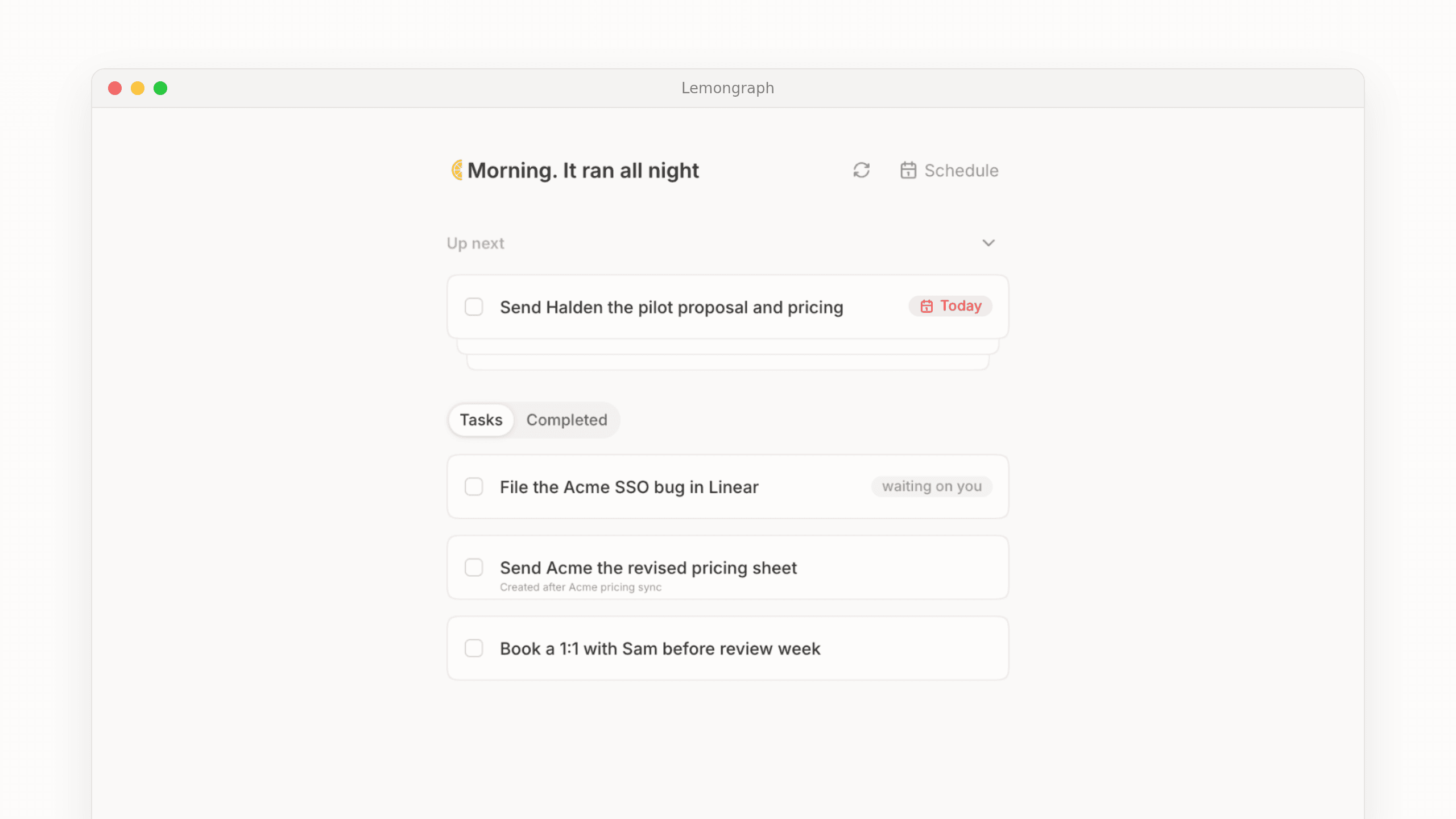
Every to-do app has to solve the daily problem of getting tasks onto the page and deciding what deserves your morning hours. In Todoist, tasks enter the system because you put them there, either by typing into Quick Add or speaking a brain dump into Ramble. We wanted Lemongraph to feel different, so action items from your email and meetings find you and land on your AI to-do list automatically. You can still type things in yourself using the Add a task box or speak them in with voice input whenever a random thought crosses your mind.
Once those tasks are in, you have to figure out where to start. Todoist relies on static due dates and p1 to p4 flags you assigned earlier in the week. Because our smart task manager keeps working in the background while you sleep, your morning greeting in Lemongraph reads "Morning. It ran all night". Every morning it builds Up next, which is a short list of what matters today. Each item explains why it's there, showing you what changed overnight and who is waiting on you.
Keeping the List Current and Snoozing for Later
A morning plan rarely survives the first two hours of work. When a Tuesday afternoon meeting reshuffles your week in Todoist, your overdue tasks pile up until you reschedule them yourself. In Lemongraph, due dates matter but they don't get the final say. Our AI task manager weighs how important something sounded in your actual conversations and looks a few steps ahead at related work, adjusting priorities on its own as plans shift.
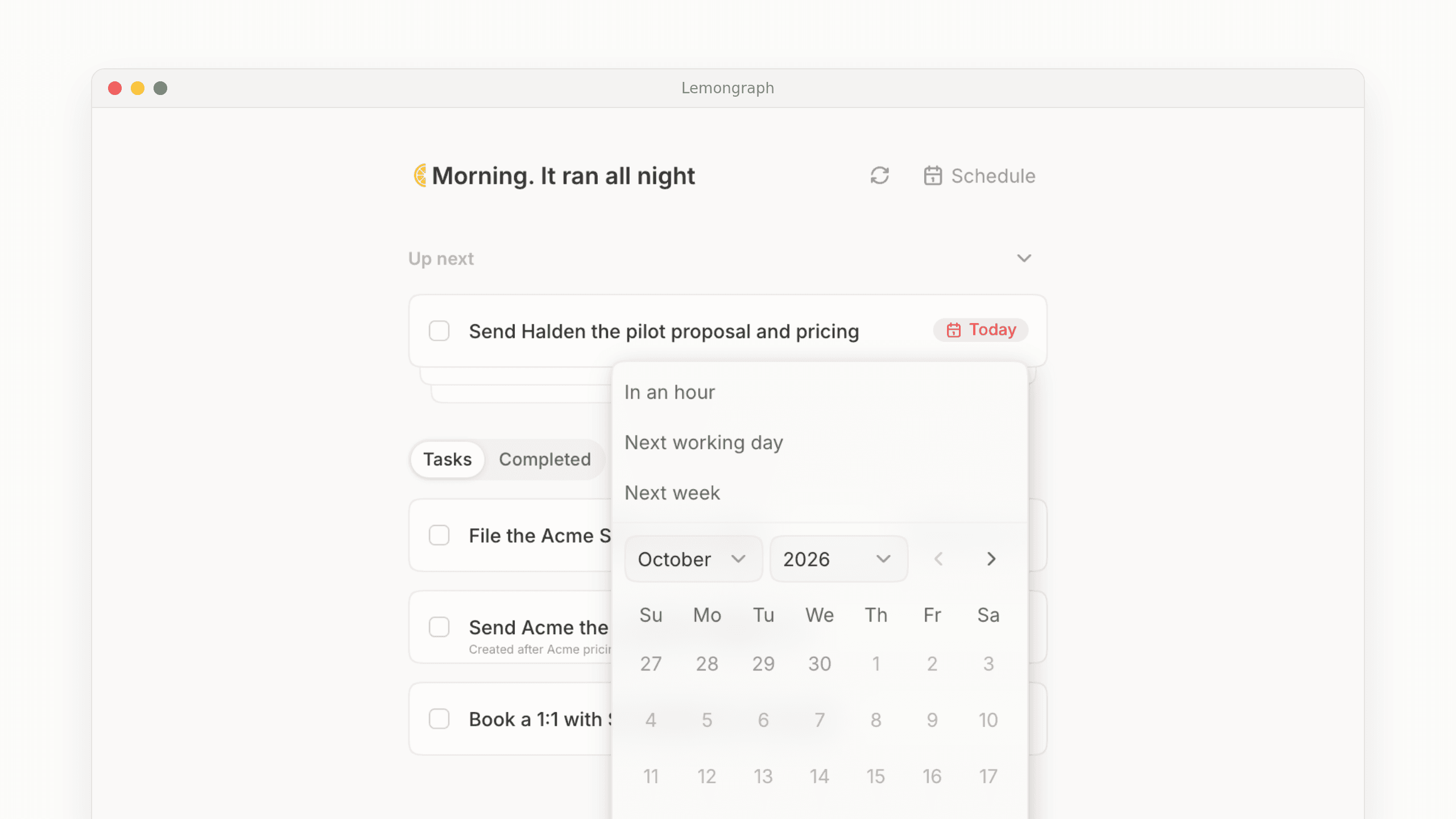
When you look at Up next and realize a task just can't happen right now, you don't have to play the fake deadline game. Our Snooze feature launched on 29 October and lets you tuck anything in Up next away for an hour or push it until the next working day. You can also send it to next week or pick a specific date, knowing it will quietly return to your list when you're ready for it.
Following Through on What You Promised Other People
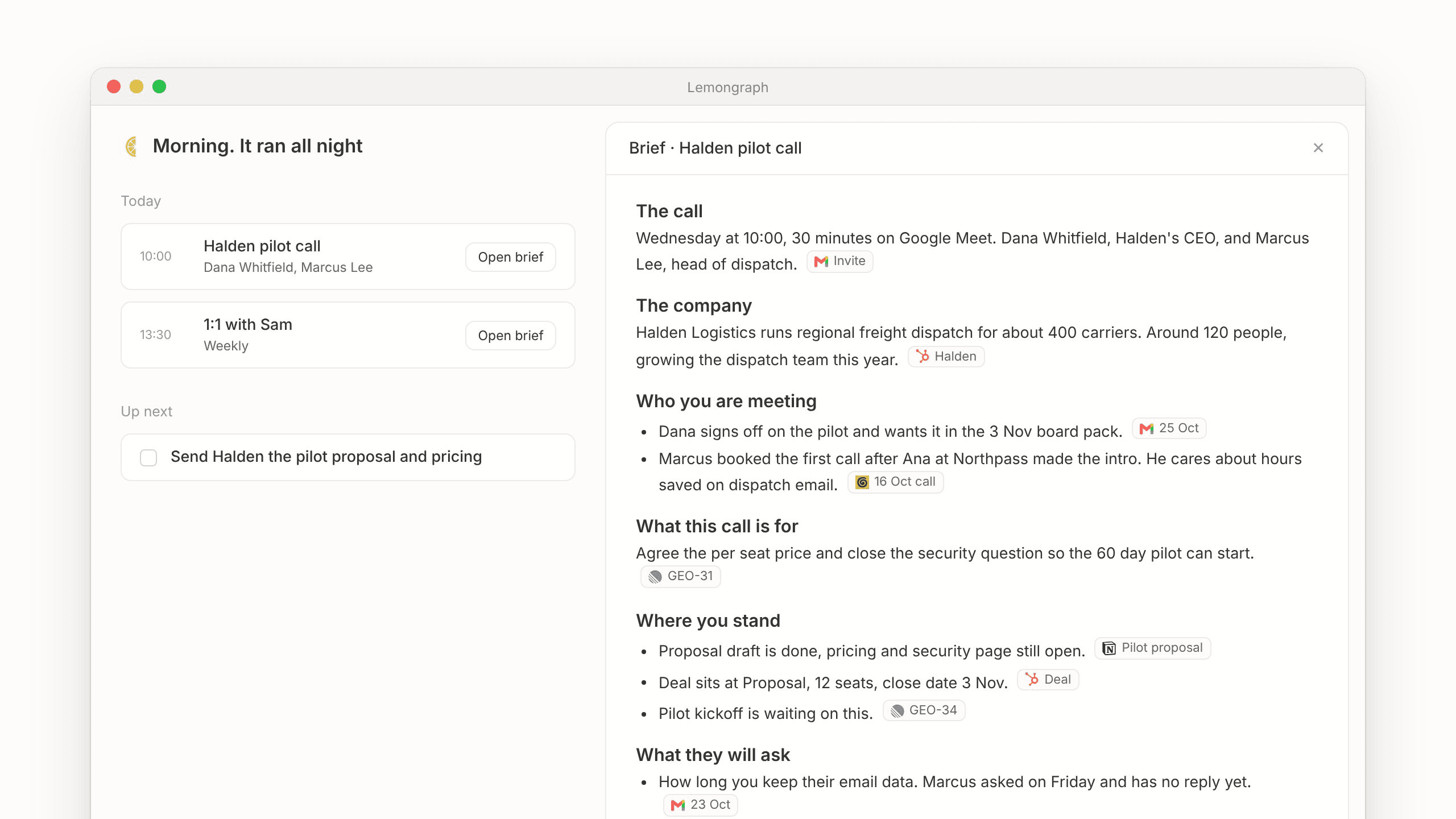
Personal productivity feels very different when your list is full of promises you made to clients and coworkers. In Todoist, following through means remembering to copy action items out of your meeting docs and checking your project boards by hand so nothing gets forgotten. Honestly, that's the job we built Lemongraph for.
- Chore spotting notices routine work hiding in your email or tools and offers to take those repetitive tasks off your list entirely.
- Meeting briefs arrive before your call with context on who you're meeting and what to prepare, where every line links to its source, whether that's an email, a CRM record or a ticket.
- Meetings to tasks reads your call notes afterward and creates or updates tasks in your project tracker, from Linear to monday.com, filling in the owner and labels for you.
- Contact memory keeps a running record of how you work with each person, building recaps that help you write performance reviews without recency bias.
- You stay in control because any action that happens on your behalf starts as Ask first, which you can switch to Always allow whenever you feel comfortable.
How the Two To-Do Apps Compare Side by Side and on Price
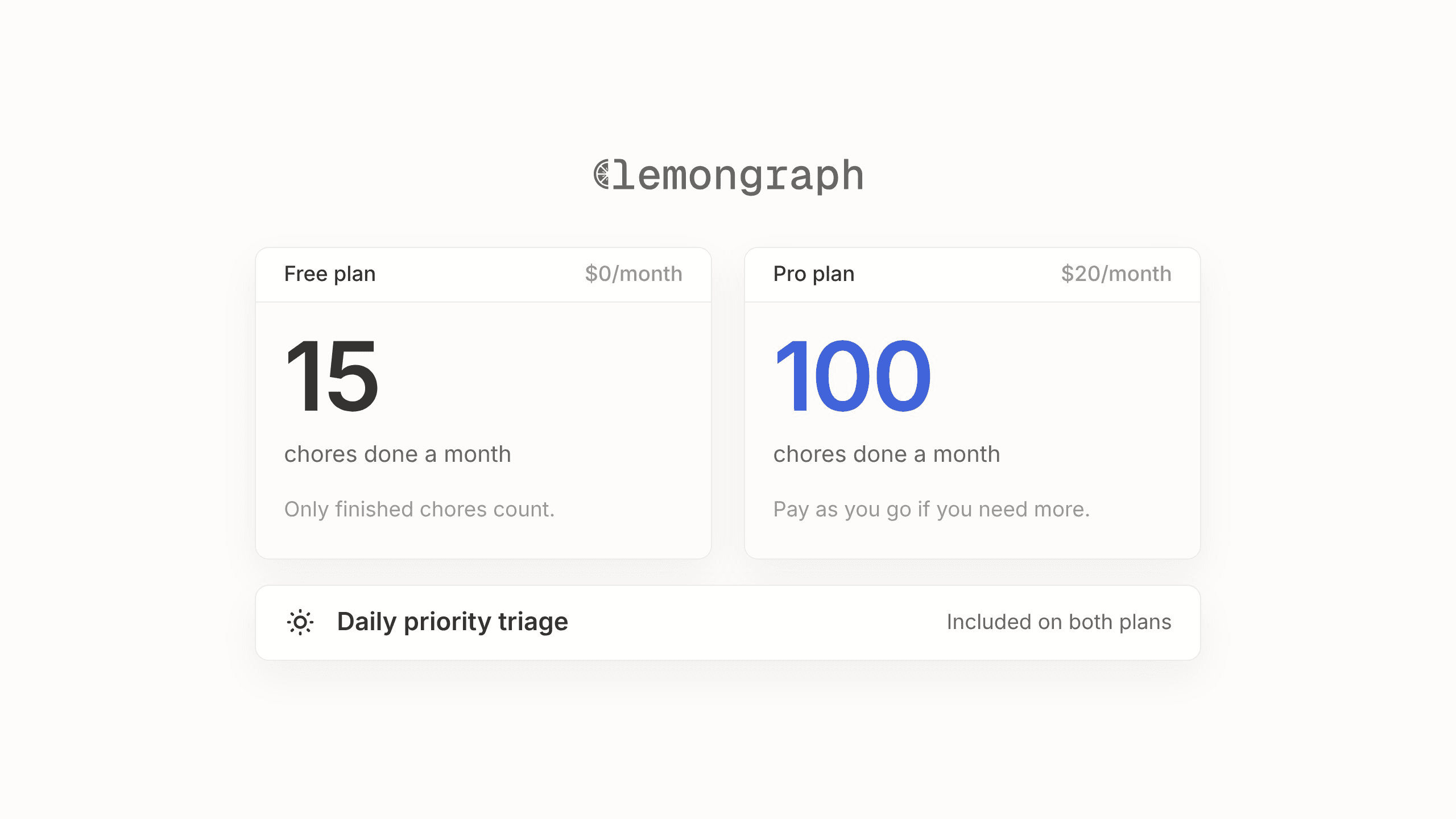
Put side by side, the difference turns out to be less about features and more about who does the upkeep. That shows up in the price too.
| Everyday Job | Todoist | Lemongraph |
|---|---|---|
| Adding tasks | Manual via Quick Add, Ramble voice or Email Assist forwarding | Automatic from email and meetings, plus typing or voice input |
| Prioritization | Manual p1 to p4 flags and static due dates | Automatic adjustments based on due dates, conversation weight and related work |
| Daily planning | Today and Upcoming views with custom filters | Morning Up next list explaining what changed, who is waiting and why it matters |
| Snooze and reminders | Reschedule due dates manually and set time or location reminders on Pro | Snooze for an hour, next working day, next week or a custom date |
| Integrations | Zapier connections and official MCP server | Gmail, Google Calendar, Linear, Asana, ClickUp, monday.com, Notion, Attio, HubSpot, Calendly, Cal.com and meeting notetakers |
| Platforms | Web, Mac, Windows, Linux, iOS, Android, watches and browser extensions | Web and Mac app in the dock |
| Free plan | $0 for up to 5 personal projects and 10 Ramble sessions a month | $0 for 5 integrations, 15 completed chore runs a month and daily triage |
| Paid price | Pro at $7 a month ($60 yearly) and Business at $10 per user a month ($8 yearly) | Pro at $20 a month for unlimited integrations and 100 completed chore runs |
Todoist uses a classic software subscription. Their Beginner plan is free and gives you up to 5 active personal projects and 3 filter views, along with a 7 day activity history, 5 MB uploads and 10 Ramble sessions a month. Stepping up to Todoist Pro costs $7 a month or $60 a year, which opens up 300 personal projects and unlimited history alongside reminders, backups and full AI features. Their Business tier is $10 per user a month or $8 billed yearly for shared team workspaces.
At Lemongraph, we price our plans per chore that actually gets done rather than making you guess at credits or tokens. Our Free plan is $0 and includes 5 integrations and 15 chore runs a month, with daily priority triage and chore spotting included. Lemongraph Pro is $20 a month for unlimited integrations and 100 chore runs a month plus email support, with pay as you go pricing if you need more beyond that. To be upfront, Lemongraph Pro costs more than Todoist Pro. You're not paying for a fancier list. You're paying for someone to keep it, reading your notes overnight and updating your project trackers so the list is right before you've finished your coffee. Under the hood, each model is selected and tested for its specific job and completion is checked against what actually happened, so tasks are only marked done when they really are.
Who Should Pick Todoist and Who Should Try Lemongraph
Choosing between these two tools has very little to do with which app has a longer feature list and everything to do with what your Tuesday afternoon looks like. You should stick with Todoist if you genuinely enjoy the ritual of maintaining your own system and use your checklist mostly for personal projects and life admin. It's also the clear winner if you work on Windows or Android devices, rely on Linux, iOS or watch apps or need shared workspaces for a whole team to check off tasks together.
Lemongraph makes more sense as a Todoist alternative if your workday runs through other people. When you're a founder, manager or consultant living in back to back calls, the list itself is rarely the problem. Keeping it alive is.
Maybe you finish five hours of meetings and realize you have twelve new promises buried in your call notes that still need typing into your task app. Maybe your Today view has twenty overdue items from last week that you keep pushing to tomorrow just to make the red numbers go away. Or maybe you spend the first thirty minutes of every morning digging through your inbox just to figure out who is waiting on you.
If those moments sound familiar, you might be ready for a list that takes care of itself. The two apps don't sync with each other, so you do have to pick which style of task management fits your head. If you want to see what it feels like when your list runs overnight, you can try Lemongraph on the free plan whenever you have a quiet morning. If you're still weighing classic apps, see our Todoist vs TickTick comparison.
Frequently Asked Questions About Todoist and Lemongraph
Is Lemongraph a good Todoist alternative?
It can be. Lemongraph is a good Todoist alternative if you like having a personal to-do list rather than another chat window to talk to, but you're tired of organizing it by hand. It works especially well for busy professionals who want their tasks pulled in automatically from email and meetings and want their daily priorities adjusted when plans change.
Does Lemongraph sync with Todoist?
No, Lemongraph doesn't sync with Todoist. They're two separate personal task managers built around different ways of working, so you would use one or the other to run your daily list.
Is Lemongraph free?
Yes, we offer a Free plan for $0 that includes 5 integrations and 15 completed chore runs a month, along with daily priority triage and chore spotting. If you need more capacity, our Pro plan is $20 a month for unlimited integrations and 100 completed chore runs.
What platforms does Lemongraph run on?
Lemongraph runs on the web in any modern browser and as a Mac app that lives in your dock. It connects with Gmail, Google Calendar, Linear, Asana, ClickUp, monday.com, Notion, Attio, HubSpot, Calendly, Cal.com and the meeting notetakers you already use.
Can I still add my own tasks by hand in Lemongraph?
Yes, you can always add and manage your own tasks by hand just like in any classic to-do app. Alongside tasks that arrive automatically from your conversations, there's an Add a task box where you can type items directly or add them by voice.