Goblin Tools alternatives for full work context
Looking for Goblin Tools alternatives that understand your actual workday? Compare Tidywell, Llama Life, Tiimo, ChatGPT and Lemongraph to find the right fit.
Nov 15, 2026
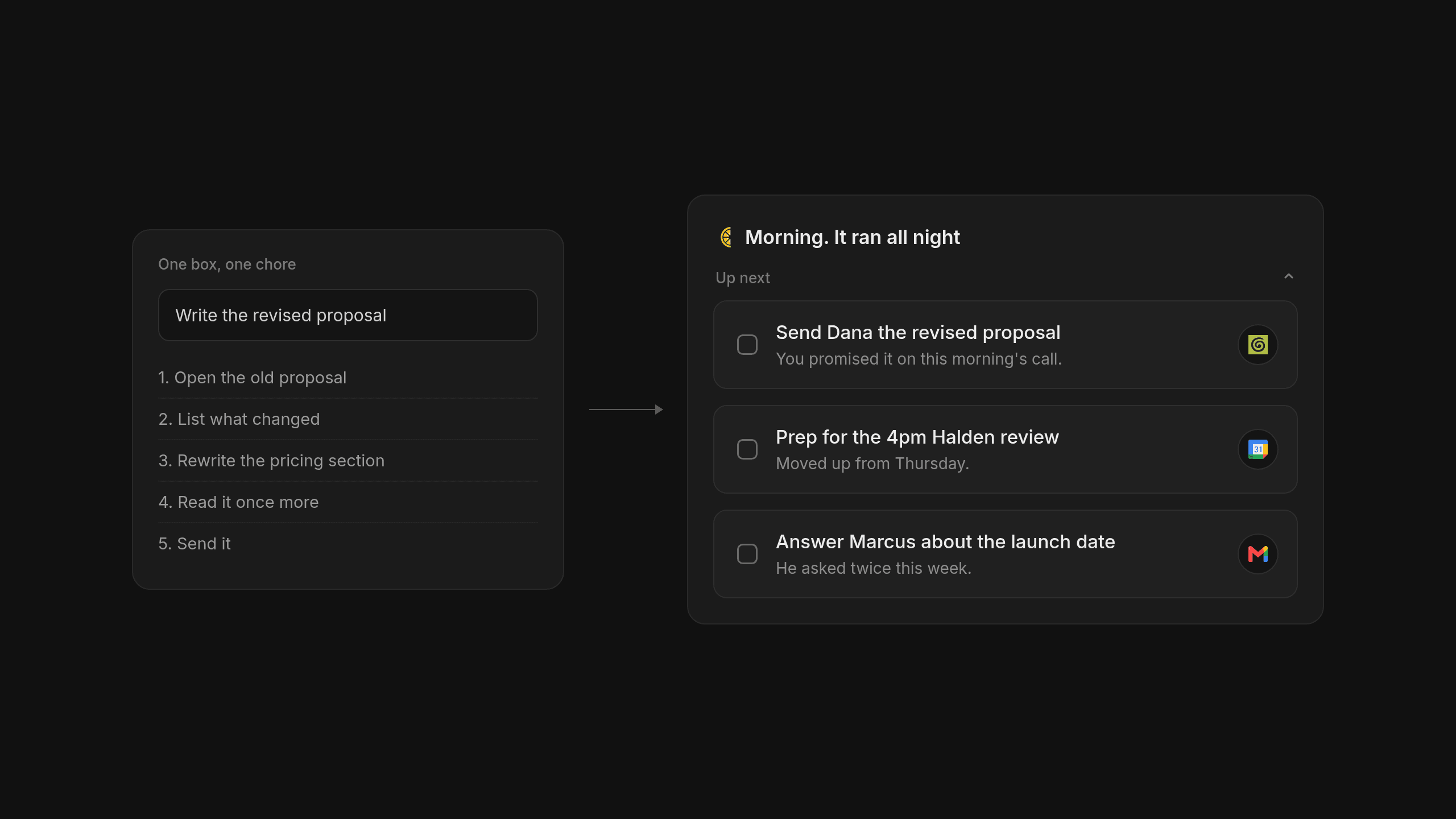
Typing a single chore into a web box and watching it turn into five tiny steps feels like magic when you are stuck on the couch. Yet the moment your actual workday begins with thirty unread emails and a rescheduled client call, breaking down one task in isolation stops helping you figure out what actually comes first. That is usually when people start looking for Goblin Tools alternatives that understand how a whole workday fits together.
Why People Look for Goblin Tools Alternatives When Work Gets Busy
If your main struggle is simply getting started on a daunting chore, Goblin Tools remains a wonderful and free choice. You type in one vague goal and it breaks that thought down into tiny steps without making you overthink. We love how honest and straightforward that is. There is no account to set up and no complicated system to learn before you can get moving.
The trouble starts when a busy founder or manager tries to lean on that single web box for a full workday. Goblin Tools only knows what you type into the screen in that exact moment. It does not have the full context of your job. It cannot see that you promised a client a revised proposal during a morning call or that your afternoon schedule just moved around to make room for an urgent review.
Breaking a single task into steps is really helpful when you have to clean your kitchen on a Sunday afternoon. It falls short when your day is driven by dozens of emails and calendar invites that constantly shift what matters most. Trying to manage a busy job by feeding tasks one by one into an isolated box feels like trying to cook dinner by only reading one recipe line at a time while someone keeps swapping the ingredients on the counter.
People start searching for apps like Goblin Tools when they realize that breaking down a chore is only half the battle. Goblin Tools is great for overcoming a blank page on a single chore, yet busy professionals eventually need a tool that understands their whole workload at once. One box is just too small for a whole job.
Why ChatGPT and Claude Get Expensive and Tiring for Task Lists
The Friction of a Talk Hungry Chat Window
When a single box feels too narrow, most people naturally turn to ChatGPT or Claude next. Unlike a simple task breaker, these large models can hold a lot of context and connect to your work documents. They are genuinely smart when you need to think through a messy problem or draft a tricky note.
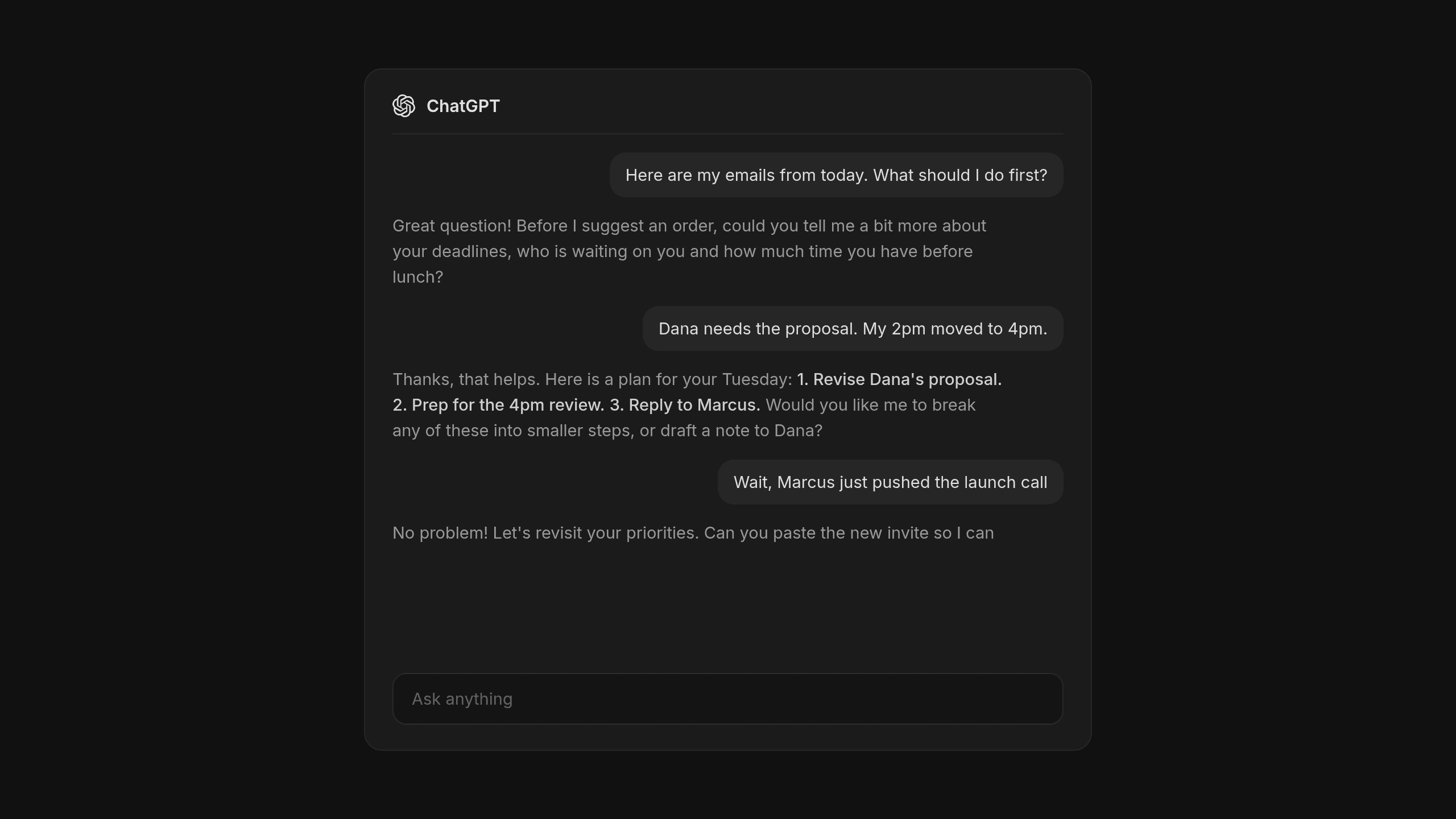
Yet using a chat window to run your daily to-do list wears you down quickly. Chat models are talk hungry by design. They want a conversation when you just want a checklist. You end up typing long explanations and going back and forth for ten minutes just to figure out what you should do before lunch. If you are using API tools or higher tier plans to feed in all your background documents, paying for all that token usage adds up fast.
Where Your Plan Goes After the Chat Ends
Even when ChatGPT gives you a great breakdown for your Tuesday, those steps are still trapped inside a scrolling conversation. There is no real place to check things off or snooze an item when a meeting runs late. Some people build saved prompts for executive function or use project brains like Tandem to keep source linked facts organized for multi stakeholder projects. Others rely on portable tools like ThreadPort to move conversations across models, and a recent analysis by Vilix AI shows how much effort goes into just keeping context alive between ChatGPT and Claude.
None of that gives you a simple daily checklist that updates when your afternoon changes. Talking to a chatbot about your work often feels like a second job when all you really want is a clear list of what to do next. You should not have to prompt your way through the morning.
Focused Apps That Take Task Breakdowns Beyond a Single Box
Tidywell and Llama Life for Pacing Your Chores
Between a single web box and a sprawling chat log sits a group of focused apps built specifically for people who get stuck on their lists. Different tools fit different ways we lose track of the day, so picking the right AI task manager depends on where your routine usually breaks down.
Tidywell is a smart step up if you want your task breakdown to live inside an actual tracker rather than disappearing into a temporary screen. It connects AI generated steps directly to a tracking view so you can follow through over time. If your main failure mode is losing track of the clock, Llama Life takes a gentler path. It pairs AI task breakdown with built in timers and purposely shows you only one task at a time so you do not freeze up looking at a giant list.
Tiimo for Visual Daily Schedules
For anyone who thinks in visual timelines rather than plain text, Tiimo works as a daily planner with an AI co-planner built in. It helps prioritize your chores and places them directly onto a visual schedule for the day so you can see how your hours actually look. Each of these focused tools shines for a specific daily habit:
- Goblin Tools fits moments when you are frozen on a single chore and need instant steps with zero setup.
- Tidywell works well when you want those broken down steps saved inside an ongoing habit and task tracker.
- Llama Life helps most when you need a countdown timer and a calm screen showing only the current task.
- Tiimo is the right call when you need to see your chores mapped out as colorful blocks across your day.
| Tool | How Tasks Get In | Work Context | Daily List Behavior | Pricing Model |
|---|---|---|---|---|
| Goblin Tools | Typed one by one | Single box only | Temporary step breakdown | Free on the web |
| ChatGPT and Claude | Typed in chat prompts | High if you paste docs | Trapped in chat logs | Monthly subscription or tokens |
| Tidywell | Entered by hand | Personal chore list | Steps connected to a tracker | Subscription app |
| Llama Life | Entered by hand | Single focus session | One timed task at a time | Subscription app |
| Tiimo | Entered by hand | Daily routine blocks | Visual timeline schedule | Subscription app |
| Lemongraph | Arrives from email and meetings | Connected to work tools | Keeps itself up to date | Free for 5 chore runs or $20 a month for 100 |
These focused apps are wonderful if you want help pacing yourself through chores you already know about, though you still have to bring every single task in by hand.
How Lemongraph Keeps Your To-Do List Current on Its Own
Tasks Arrive From Where Your Work Actually Happens
We built our AI native personal task manager because we were tired of maintaining our lists by hand. Classic apps like Todoist are great when you have time to file everything yourself, yet keeping a list organized quickly becomes a chore of its own when your day is driven by other people. We wanted a true AI to-do list that is still a simple to-do app at heart. Instead of waiting for you to type prompts, Lemongraph keeps itself up to date.
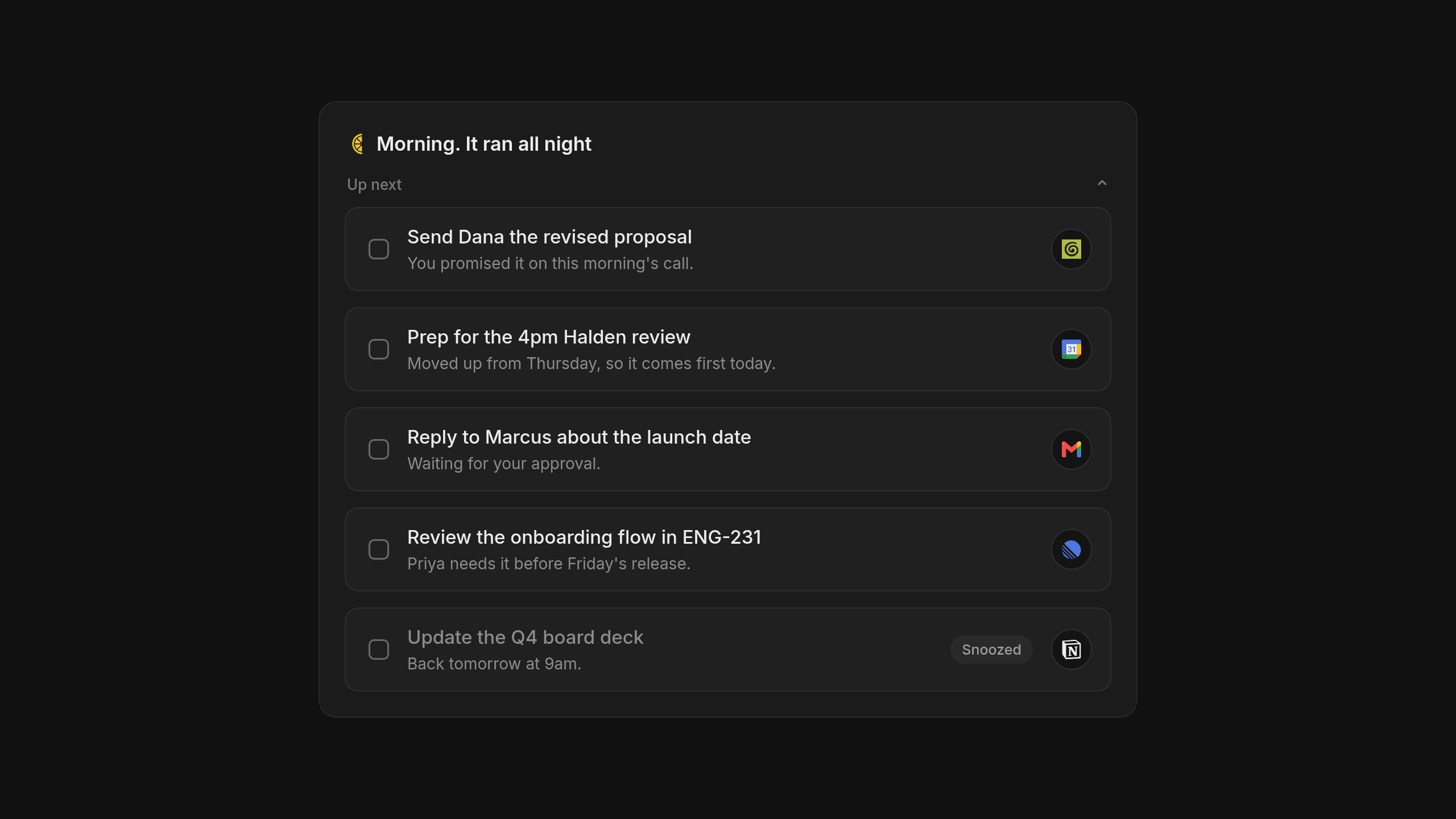
To solve the full context problem, tasks arrive automatically from your email and meetings. We connect directly with Gmail and Google Calendar so the things you promised to do on a call land on your list without you copying them over. Lemongraph also connects with project trackers like Linear and Asana or ClickUp and monday.com. You can hook up Notion and HubSpot or Attio and Granola so your work context stays in one place. Before a call starts, you get meeting briefs with every detail linked to its source, while nothing happens on your behalf without your approval. Here is how that feels across a normal workday:
- Tasks from your inbox and recent meetings show up on your list waiting for your quick approval.
- Every morning the Up next view shows what actually matters today and explains why it belongs at the top.
- When your afternoon plans change, your priorities adjust on their own without manual dragging.
- You can snooze anything you cannot touch today and it comes back when you are ready.
Plain Pricing and Honest Tradeoffs
We want to be clear about what Lemongraph is and where it has limits right now. Our personal task management app runs on the web and Mac, and it does not sync with Todoist. We also think paying for chat credits is confusing, so we charge per chore that actually gets done. The Free plan is $0 with 5 chore runs a month and the Pro plan is $20 a month with 100 chore runs.
If you just need a free button to break down cleaning your garage on a Saturday, you should stick with Goblin Tools. If your workday lives in email and meetings where every conversation ends with a new promise to keep, we built Lemongraph for you.
Frequently asked questions
Is Goblin Tools still worth using in 2026?
Yes, without question. When you are staring at a single overwhelming chore and just need someone to break it into tiny pieces so you can get moving, Goblin Tools is still the fastest free option available. Because there is no login or setup required, it remains a favorite bookmark for quick task initiation when you do not need your whole work schedule factored in.
Why use an AI native task manager instead of ChatGPT or Claude?
ChatGPT and Claude are built for open ended conversation rather than daily task execution. Even when you connect them to your work files, you still have to prompt them every morning and copy their answers into a separate checklist. A dedicated personal task manager pulls tasks straight from your email and meetings, maintains a real list that adjusts when plans change and tells you what comes first today without making you chat.
How does Lemongraph pricing work compared to credit tools?
Instead of charging you for tokens or back and forth messages, Lemongraph charges only per chore that actually gets done. You can start on the Free plan for $0, which includes 5 chore runs a month, or move to the Pro plan for $20 a month, which gives you 100 chore runs.
Pick the tool that matches where you actually get stuck during the day, whether that is starting a single chore or keeping up with a shifting job. Your list should do the heavy lifting for you.