Best task manager to prioritize your day
Most task managers show you a Today view that you sorted yourself. Here's how popular ones decide what comes first and which one tells you why.
Written by George Kats · Sep 9, 2026 · Updated Nov 26, 2026

It's 9am and your Today view has eleven tasks. You dated all of them last week. At noon a client replies and three of them should move. Your list doesn't know.
Most task managers don't prioritize your day. They show what you dated and flagged, in an order you set. Motion schedules your tasks hour by hour. Sunsama drafts a plan each morning for you to look over. Lemongraph ranks your action items from what people said and did and puts a reason next to each one. If you want every hour laid out on a calendar, pick Motion.
One of these apps is ours. We checked each company's own pages on November 26, 2026.
Todoist, TickTick and Things 3 show what you dated
You open Today. There are your eleven tasks, right where you put them.
Todoist has four priority levels, a Today view and filters for any view you can think of. TickTick adds an Eisenhower matrix and Suggested Tasks, which recommends unfinished work for today. Things 3 has a Today list you fill each morning.
All three are calm and fast. All three show your own decisions back to you. When your day changes after you planned it, you fix that order by hand.
Motion schedules every hour
Your 11am runs over. Your afternoon rearranges itself and nobody drags anything.
You tell Motion what you have to do, when it's due and how long it takes. It schedules everything around your meetings, shows your top priority each hour and warns you days ahead when a deadline is in trouble.
Motion answers "when". It works from tasks and dates you give it.
Akiflow and Reclaim block time on your calendar
You have six tasks and four free hours. Akiflow pulls those tasks in from your other tools and can block time for them, or you drag each one yourself.
Reclaim comes at it from your calendar. It fits tasks, habits and focus time around your events by priority and moves them as your week changes.
Sunsama drafts your day for you to review
You write two lines: finish the proposal, low energy after lunch. A few minutes later there's a plan.
Sunsama's planning agent checks your calendar, email and connected tools and drafts your day. It follows rules you've set, like when you stop working. You review that plan before you start.
Lemongraph ranks your day and tells you why
Back to that client reply at noon.
Lemongraph reads conversations your work runs through, in Gmail and in your meeting notes. So it sees things your due dates don't. Somebody is waiting on you. A decision is stuck until you reply. A client asked twice.
Every morning it ranks your action items and gives you Up next, a short list of what deserves your time today. Due dates get a vote. They don't get the only vote.
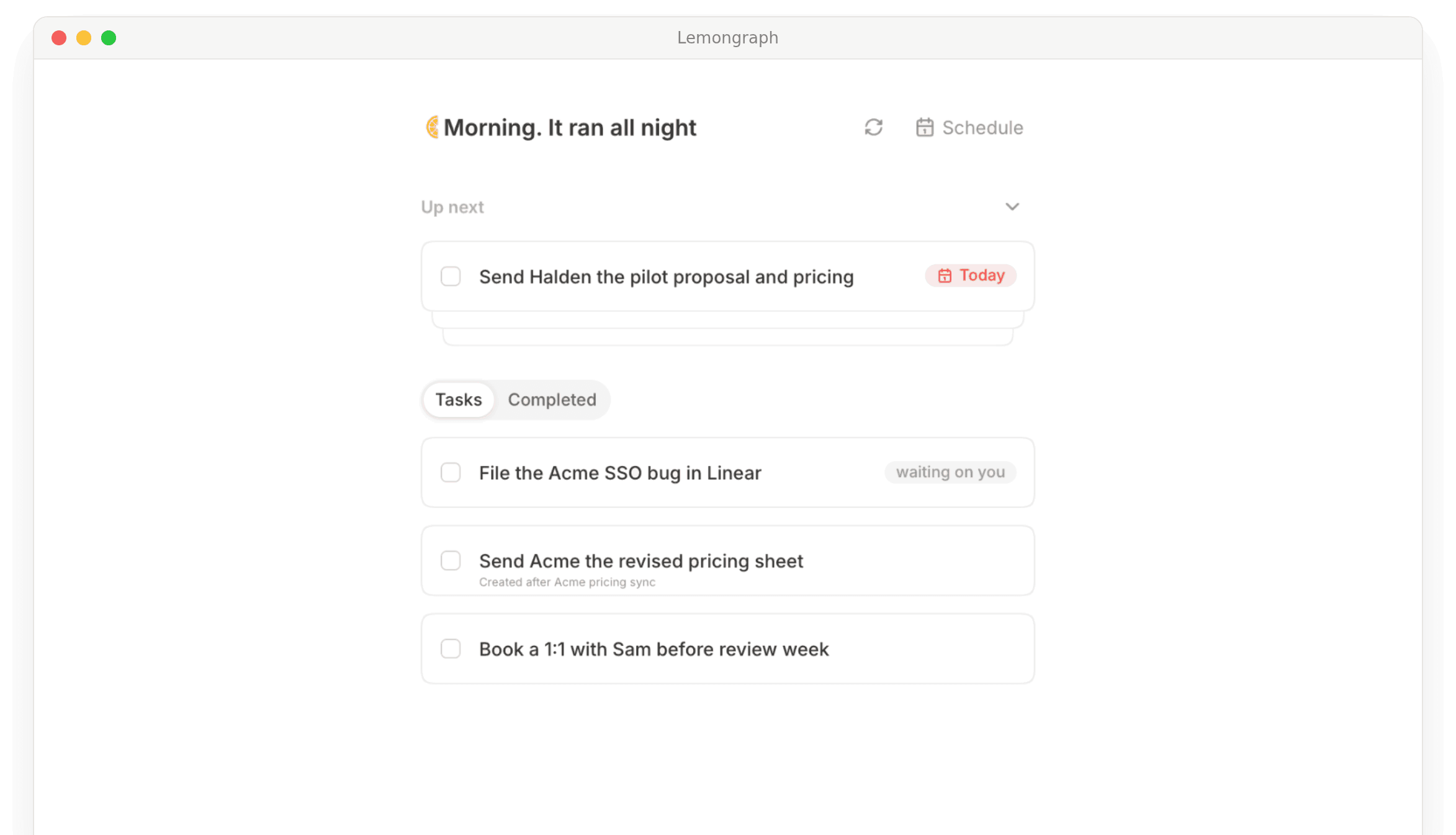
Each item says why it's there, in one sentence. On a busy day that's what lets you trust the order.
It knows when one action item can't finish until another does and it leaves out work that's blocked. So when your launch date slips on a late call, tomorrow's Up next already has the quote your engineering lead needs before she can lock a new one.
Not today? Snooze it for an hour, until your next working day, until next week or until a date you pick.
What we don't do: Lemongraph has no calendar. It tells you what matters and not when to do it. If you want your hours blocked out, that's Motion. It reads Gmail only, runs on the web and is built for one person.
Side by side
| Who decides | What it goes on | Tells you why | Calendar | |
|---|---|---|---|---|
| Lemongraph | Lemongraph ranks your action items each morning | Your email and meeting notes, who's waiting and what's blocked | Yes, next to each item | None |
| Motion | Motion schedules your tasks and replans all day | Deadlines, priorities and dependencies you set | It warns you when a deadline is at risk | It fills it for you |
| Sunsama | A planning agent drafts your day and you review it | What you write, your calendar, email and connected tools | You see its plan before you start | It timeboxes your tasks |
| Akiflow | You do, or Akiflow blocks time for you | Tasks from your connected tools | You set the order | Center of the app |
| Reclaim | Reclaim schedules your tasks by priority | Priorities and due dates you set | You set priorities | It fills it for you |
| TickTick | You do, with Suggested Tasks and a matrix | What you typed in | You set the order | Views you arrange |
| Todoist | You do, with priority levels and filters | What you typed in | You set the order | Calendar layout |
| Things 3 | You do, in a Today list | What you typed in | You set the order | Your events in Today |
Which one should you pick?
Your work comes from other people and you want one short list that says what matters and why. Try Lemongraph.
You want every hour planned. Pick Motion.
You want a drafted plan to look over each morning. Pick Sunsama.
You like deciding for yourself. Pick Todoist or TickTick.
Need a method more than an app? Our guide on how to prioritize tasks works anywhere. Every comparison is on our compare page. Got something wrong about one of these apps? Let us know at hey@lemongraph.dev.
Frequently asked questions
Which task manager prioritizes tasks automatically?
Lemongraph ranks your action items each morning and tells you why. Motion schedules your tasks onto your calendar from deadlines and priorities. Sunsama has a planning agent that drafts your day for you to review.
How does Lemongraph decide what comes first?
It looks at what people said and did in your email and meeting notes, like whether someone is waiting on you or a decision depends on your reply. It also weighs due dates and leaves out work that's blocked by something else.
What is the difference between scheduling and prioritizing?
Scheduling decides when you do each task. Prioritizing decides which tasks matter most. Motion and Reclaim schedule. Lemongraph prioritizes and has no calendar.
Does Todoist prioritize my day for me?
No. Todoist gives you priority levels, a Today view and filters. You set every priority yourself.
Does Lemongraph put tasks on my calendar?
No. You get Up next, a short list of what deserves your time today with a reason next to each item.
Keep reading
Todoist Pricing in 2026: Is It Free and Is Pro Worth It?
A plain guide to Todoist pricing in 2026. What stays free, why Pro costs $7 a month or $60 a year and who gets real value from paying to upgrade.
Todoist vs TickTick in 2026: which to-do app fits your day?
Todoist or TickTick? Pick Todoist for fast capture, AI help and teams. Pick TickTick for a calendar, habits and a focus timer for less money.
TickTick pricing in 2026: is it free and is Premium worth it?
TickTick has a generous free plan and Premium costs $49.99 a year. Here's every limit, the monthly math and who should pay.
All comparisons
Every comparison, alternatives guide and pricing guide we have written.
Lemongraph connects to Gmail, Google Meet, Granola, Wispr Flow, Calendly, Cal.com, Notion, Google Docs, Linear, Asana, ClickUp, monday.com, Attio and HubSpot.
Todoist Pricing in 2026: Is It Free and Is Pro Worth It?
A plain guide to Todoist pricing in 2026. What stays free, why Pro costs $7 a month or $60 a year and who gets real value from paying to upgrade.
Meeting action items: how to write them, a free template and how to stop retyping them
What makes a good meeting action item, a real example, a free meeting minutes template with action items and how to stop retyping them after every call.