Trello alternatives
Trello is wonderful for work you can see on a board. If boards stopped fitting how you work, here are the apps we would look at and when we would stay.
Written by George Kats · Nov 26, 2026

Which Trello alternative fits depends on why boards stopped working for you. Asana keeps your boards and adds timelines for bigger projects. ClickUp puts tasks, docs and chat in one app. Linear is built for software teams and Notion keeps boards right next to your docs. If you used Trello by yourself, Todoist is a simpler list. Lemongraph is for work that arrives in email and meetings before anyone makes a card for it. If your team likes watching cards move across columns, we'd stay with Trello.
Let's start with what Trello gets right. Boards are easy. You make a few lists, add cards and drag them to the right as work moves along. You can explain it to a new teammate in about a minute and that's rarer than it sounds.
Trello has also grown past boards. Trello Inbox captures to-dos from email, Slack and Microsoft Teams. Planner syncs with Google Calendar and Outlook so you can give your cards a time slot.
So if your team is happy moving cards around, we'd stay. This page is for people who feel that boards stopped fitting. One of the apps below is ours and we'll tell you when we get to it.
Why do people look for a Trello alternative?
In our experience there are three reasons and each one leads somewhere different.
The first is size. Boards work beautifully for ten cards and get hard to read at two hundred. Columns can't show you which card is waiting on another or when your whole project will be done.
The second is everything around your tasks. Teams start wanting docs, timelines and reports in one place and they end up running other tools next to Trello.
The third is the one we care about most. Every card is there because somebody made it. Trello Inbox helps you save things from email and chat but you're still the one who decides what to save and which board it belongs on.
What if our projects outgrew boards?
Then Asana is where we'd look first. It shows your work as lists, calendars, timelines, Gantt charts or Kanban boards. Your team keeps its boards and gets a timeline for everything boards can't show.
You do give something up. Asana takes more setup than Trello and small teams with simple work may find it heavy.
What if we want fewer tools?
ClickUp was built for that. Tasks, Docs and Chat live in one workspace with many ways to view them.
All of those options take time to learn. If you loved how simple Trello is, ClickUp will feel like a very different app.
What if we build software?
Then look at Linear. It tracks issues, projects and roadmaps for product development, from roadmap to release. It has clear opinions about how software teams should work, which is a big part of why engineers like it.
It isn't meant for marketing calendars or personal errands, so teams outside engineering usually want something else.
What if our tasks belong next to our docs?
Notion is a workspace for wikis, docs and projects. Your tasks live in databases that you can view as boards, timelines or calendars and they sit right next to pages that explain them.
Notion gives you pieces and you build your own system from them. That takes effort to set up and more effort to keep tidy.
What if I only used Trello for myself?
Plenty of people do. They use Trello as a to-do list that happens to have columns.
Todoist does that job with less arranging. You type "send the deck to Maria Thursday at 3pm" and it works out the date and the time for you. It has board layouts too, in case you'd miss your columns.
What about the work that never becomes a card?
This is the part we work on and it's why we built Lemongraph.
We believe most work starts in conversations with other people. Say a client asks for a revised quote in the last two minutes of your call. In Trello that becomes a card once somebody remembers to make one. Until then it lives in your head.
Lemongraph is a knowledge factory and meeting point for your priorities and your agents. It follows the conversations your work runs through, in Gmail and in your meeting notes from Granola, Wispr Flow and Google Meet. That quote shows up on your list with the call it came from. Nobody has to make a card.
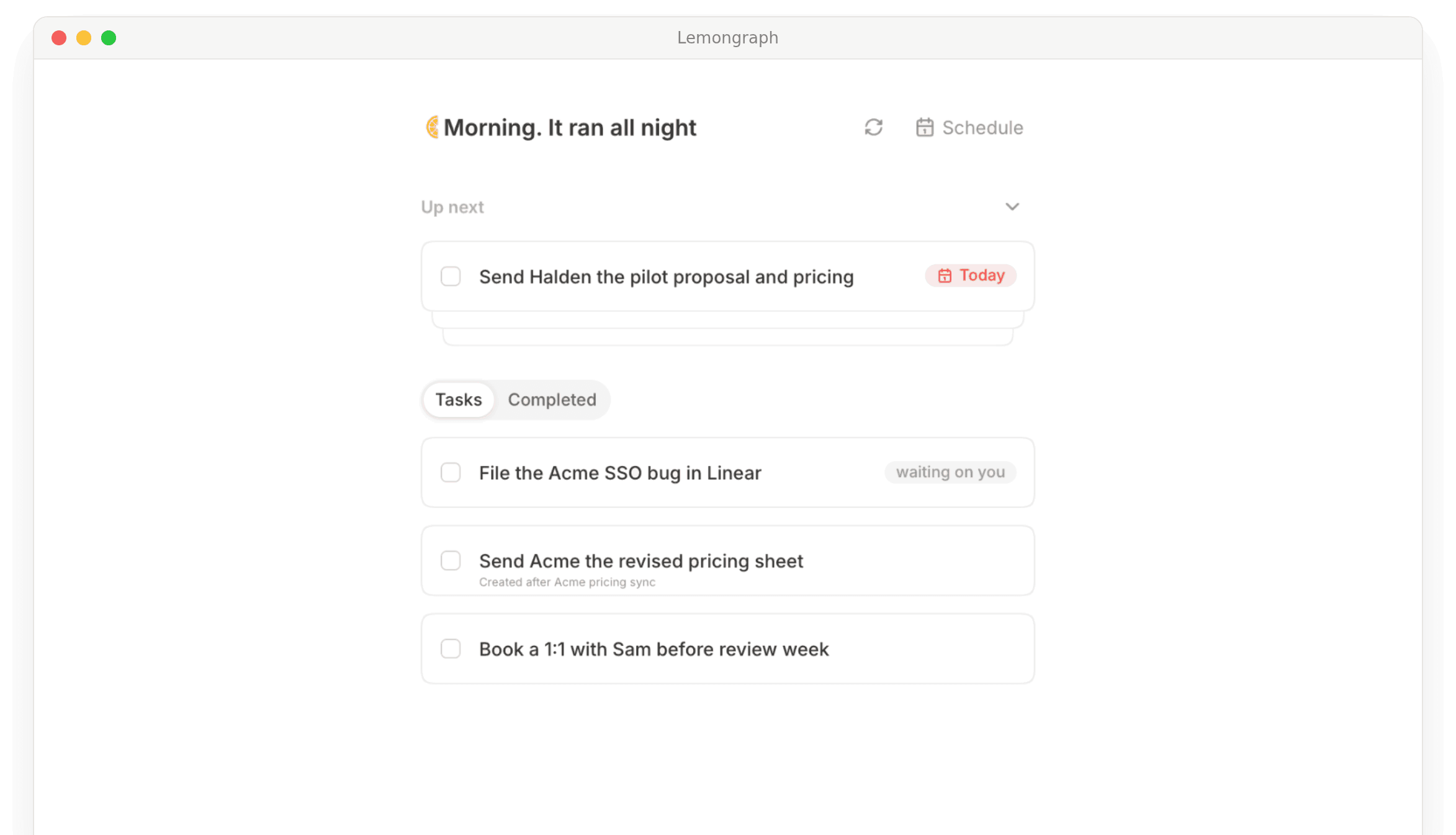
Every morning Up next shows what deserves your time today and each item says why it's there. Your agents work from that same list. Claude, ChatGPT, Grok Bot, Muse, Hermes and OpenClaw connect over MCP, so when one of them picks up an action item it already knows who's involved and what was promised.
It also gets along with the team tools on this page. If your team moves to Asana, ClickUp, Linear or monday.com, Lemongraph shows their tasks beside your action items and lets your agents create and update them.
Now for what we don't do. Lemongraph isn't a board and it won't replace Trello for your team. It's built for one person with a Google account, it runs on the web with no phone app and it doesn't connect to Trello.
Side by side
| Good at | How work gets in | Teams | Boards | |
|---|---|---|---|---|
| Trello | Simple boards that anyone can use | You add cards and Inbox captures from email, Slack and Microsoft Teams | Yes | Yes |
| Asana | Bigger projects that need timelines | You add tasks | Yes | Yes, next to lists, calendars, timelines and Gantt charts |
| ClickUp | Tasks, docs and chat in one app | You add tasks | Yes | Yes, among many other views |
| Linear | Issues and roadmaps for software teams | You add issues | Yes | Yes |
| Notion | Boards right next to your docs | You add database entries | Yes | Yes, as database views |
| Todoist | Personal lists you can type fast | You type tasks in | Team plans | Yes |
| Lemongraph | Action items from email and meetings, with the story attached | Lemongraph reads Gmail and your meeting notes | None. It's built for one person | No |
Which one should I pick?
If your projects outgrew boards, pick Asana. If you want fewer tools, pick ClickUp. If you ship software, pick Linear. If your tasks belong next to your docs, pick Notion. If you used Trello by yourself as a to-do list, pick Todoist.
If most of your work starts in email and calls and never becomes a card, we'd love for you to try Lemongraph.
And if your team likes seeing work move across columns, none of these does that more simply than what you have. Stay with Trello.
We wrote similar pages for Todoist, TickTick, Motion and Akiflow and you can find every comparison on our compare page. If we got something wrong about any of these apps, please tell us at hey@lemongraph.dev.
Frequently asked questions
What is the closest alternative to Trello?
For teams it's Asana. You keep Kanban boards and get lists, calendars, timelines and Gantt charts for that same work.
What is the best Trello alternative for personal use?
Todoist, if you type your own tasks. Lemongraph, if your tasks come from other people in email and meetings.
Which Trello alternative is best for software teams?
Linear. It tracks issues, projects and roadmaps and it's built around how product teams work.
Does Lemongraph replace Trello?
Not for teams. Lemongraph has no boards and no team workspaces. It's built for one person.
Does Lemongraph work with Trello?
Not today. It connects to Linear, Asana, ClickUp and monday.com.
Keep reading
Akiflow alternatives
Akiflow puts tasks next to your calendar and leaves planning to you. If you'd like less of that, here are the apps we'd look at.
Finding a Microsoft To Do Alternative Before 2027
Microsoft To Do retires on June 30, 2027. Here's what happens to your lists and where we'd move them.
Motion alternatives
Motion plans your calendar for you. If that isn't how you like to work, here are five apps we'd look at and what you give up with each.
All comparisons
Every comparison, alternatives guide and pricing guide we have written.
Lemongraph connects to Gmail, Google Meet, Granola, Wispr Flow, Calendly, Cal.com, Notion, Google Docs, Linear, Asana, ClickUp, monday.com, Attio and HubSpot.