Motion vs Lemongraph
Motion already takes notes in your meetings and plans your day. So why did we build Lemongraph? Our honest answer, including when to pick Motion.
Written by George Kats · Oct 25, 2026

Motion is right for you if you run projects with teams or like having your day scheduled hour by hour. It puts every task on your calendar and moves things when meetings run over. Lemongraph suits people who work mostly alone and spend their day on calls and email. It finds action items in Gmail and meeting notes, so you never forward anything. There's no calendar here and no team workspace.
You're probably wondering why we'd write this one.
Motion already takes notes in your meetings. It already turns them into tasks. It already tells you what to do next. Put their homepage next to ours and it's a fair question. Why does Lemongraph exist?
We've asked ourselves that. More than once, honestly. So this is the long answer. It includes the parts where you should close this tab and go get Motion.
First, what Motion gets right
A lot.
Motion is the best thing we've seen at planning time. You tell it what you have to do, when it's due and how long it takes. It puts every task on your calendar. Then your 11am runs over and the afternoon quietly rearranges itself. Nobody had to drag anything.
It's built for teams, too. Describe a project and it writes out the stages, the tasks and who's doing what. It plans the work across everybody's calendar and warns you, days ahead, when a deadline is in trouble. You get Gantt charts, dashboards, docs and a chat that can search all of it.
It's everywhere. Web, Mac, Windows, iOS, Android.
If you run a team and your work is projects with deadlines, that's your answer. Really. We'd pick it too.
So why did we build something else?
Because of a belief we can't shake. Being someone people can count on shouldn't take this much effort.
Think about where your work really comes from. Not from a project plan. From other people. A client asks for something in the last two minutes of a call. A colleague adds "can you also" to the bottom of an email. Your manager says "let's pick this up next week" and means you pick this up next week.
None of that is hard. It's just a lot. We call it the work behind work. It's the part we wanted to take on.
Motion helps here and we should say so. Its notetaker joins your Zoom, Google Meet and Microsoft Teams calls and turns what was said into tasks.
Email is where it stops. An email becomes a task in Motion when you forward it. Which means somebody still reads the whole inbox and decides which messages are a promise. That somebody is you, probably at 8am, probably before coffee.
We wanted that job gone.
What we built instead
Lemongraph is a knowledge factory and meeting point for your priorities and your agents. That's a mouthful, so here's what it looks like on a Tuesday.
You connect Gmail and wherever your meeting notes live (Granola, Wispr Flow or Google Meet). Then you go do your job. Agree to something in a thread and it's on your list before you've moved on, with a link back to where it was said.
You don't forward anything.
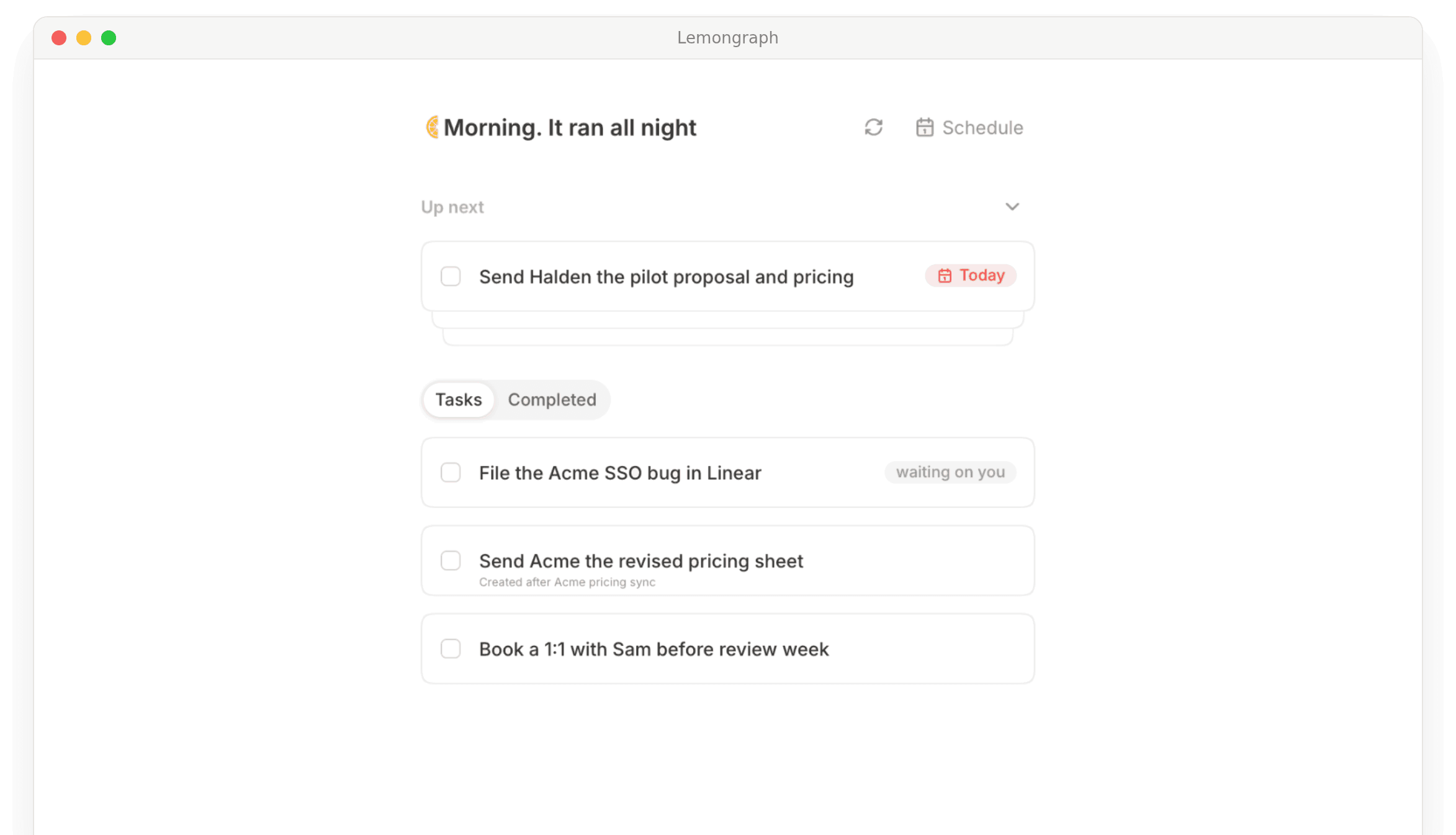
(You can still add your own. Type it into the Add a task box, or just say it out loud.)
"A task is a task. What's the difference?"
Fair. Let's get specific.
Ana from finance asks for the vendor numbers in the last two minutes of a call.
In Motion, you get a task with a description from the call, a deadline and a time on your calendar. That's good! That's more than most apps do.
In Lemongraph, the same task shows up with the call. So does the thread from last week where Ana first asked. So does the date she mentioned in that thread, which you'd forgotten.
It shows up with Ana, too. Lemongraph keeps a page for every person you work with. Who they are to you, how they like to work, what's still open between the two of you. Ana likes the total up top and three lines underneath. It's on her page. You don't have to remember it.
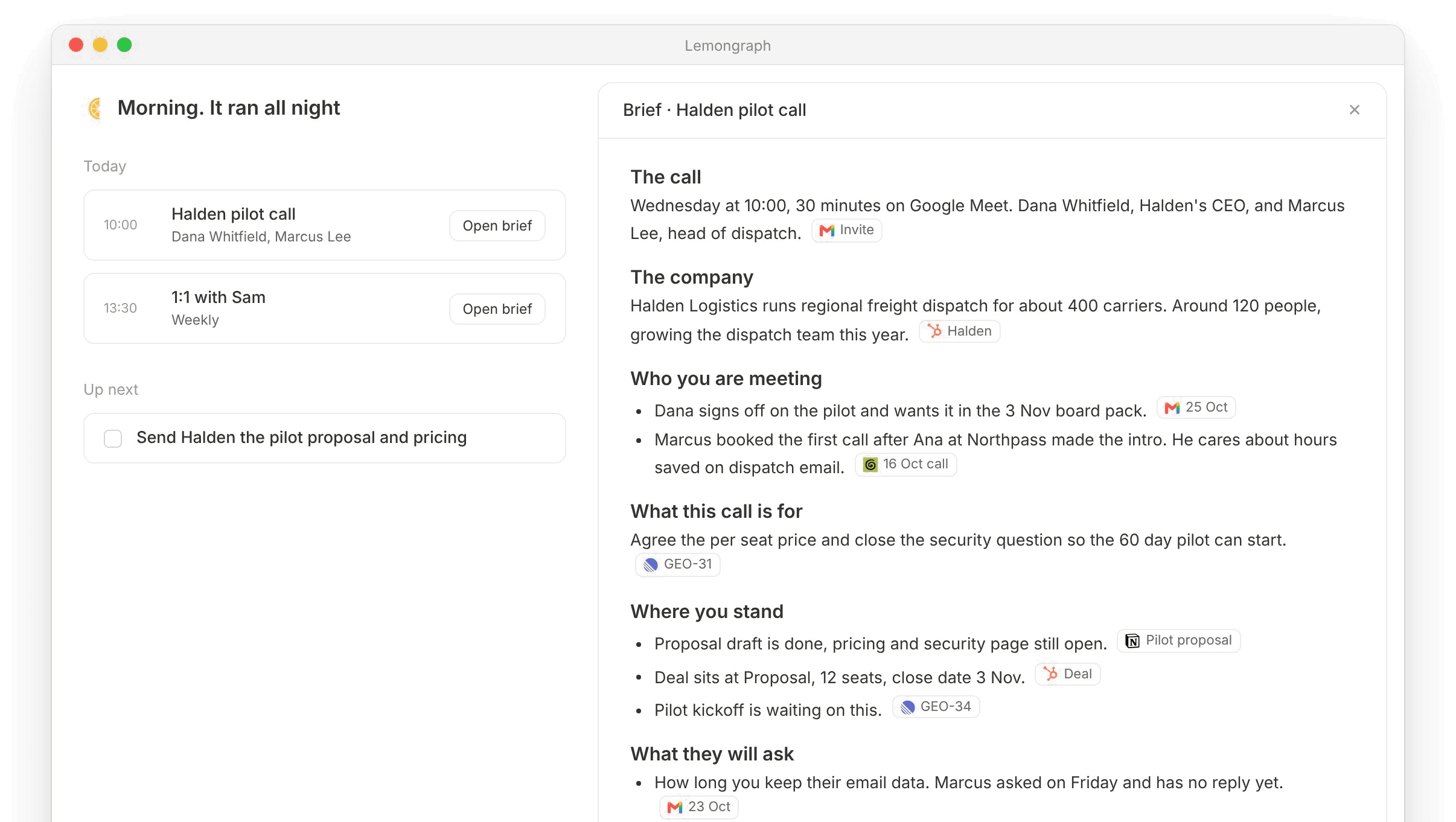
Before your next call with her, a meeting brief is waiting. Who you're meeting, what to prepare. Every line links to where it came from.
"Okay, but where do I start in the morning?"
In Motion, you open your calendar. Whatever's in the current block, that's what you do. Some people love that. It's a calm way to work.
We don't have a calendar. We went a different way.
Every morning you get Up next, a short list of what deserves your time today. Each item says why it made the list. Someone is waiting on you. A decision is stuck until you reply. Due dates get a vote, they just don't get the only vote.
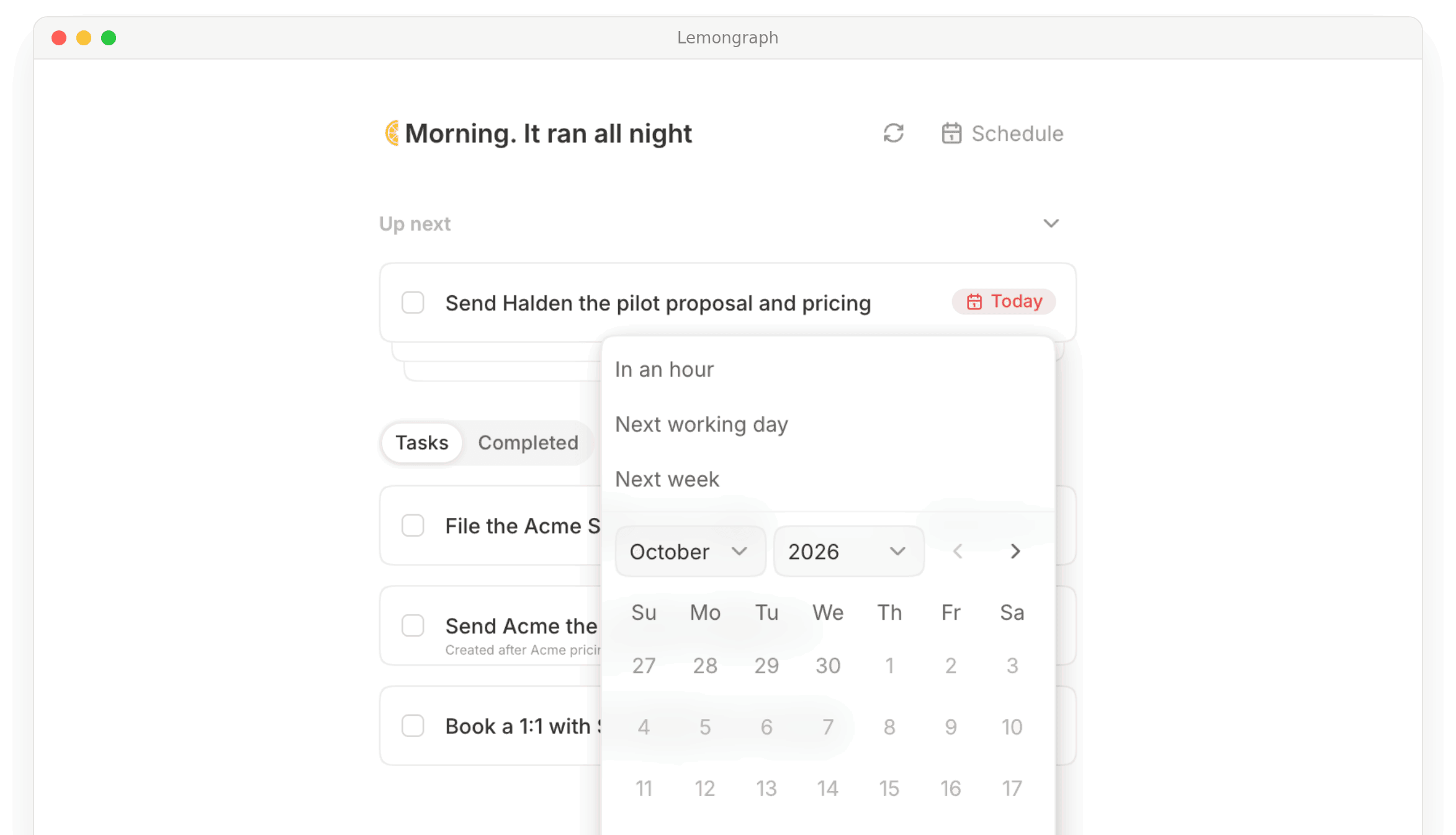
It also knows when one thing can't finish until another does. So when the launch date slips on a late call, tomorrow's Up next already has the quote your engineering lead needs before she can lock the new one.
Not today? Snooze it. An hour, the next working day, next week, or a date you pick.
The part we care about most
Here's where we get a little opinionated.
Motion has its own AI chat, built in. That's a reasonable call. We made the opposite one. Lemongraph has no chat.
We think you already have an agent you like. Maybe it's Claude. Maybe ChatGPT, Grok Bot, Muse, Hermes or OpenClaw. You don't need one more. What you need is for the one you have to stop treating you like a stranger.
So you connect it over MCP. Now when it picks up an action item, it gets the people, what was promised and what the work depends on. No more pasting in two threads so it knows why you're asking.
It walks in already knowing the story.
One more thing. Some work comes back every single week, like the Friday update to a client. When Lemongraph spots one, it shows up with a Hire button. We call them chores. Go ahead, hire your least favorite one.
Side by side
| Motion | Lemongraph | |
|---|---|---|
| Who it's for | Teams and individuals running projects with deadlines | One person whose day is meetings and email |
| How work gets in | You add it, the notetaker joins your calls and you forward emails | Lemongraph reads Gmail and your meeting notes (and you add your own when you want to) |
| What a task comes with | A description, a deadline, a duration and a time on your calendar | The conversation it came from, the people involved and what depends on it |
| Where to start | Your calendar, replanned through the day | Up next each morning, with the reason next to each item |
| Calendar | Time blocking done for you | None |
| Projects and teams | Projects, stages, assignees, Gantt charts and dashboards | None. It's built for one person |
| Meetings | A notetaker that joins, records and assigns the action items | A brief before the call, action items after it |
| AI | A chat built into Motion | No chat. Claude, ChatGPT and others connect over MCP |
| Where it runs | Web, Mac, Windows, iOS and Android | Web |
What we don't do
We'd rather you hear this from us than find out halfway through setup.
It's built for one person. No team workspaces, no projects, no assigning work to anybody else. If that's what you need, it's Motion.
Sign in is Google only. If you live in Outlook, we can't help you. We're sorry about that.
No iPhone or Android app. No calendar to block time on. It doesn't sync with Motion.
So, which one?
If you run a team, Motion. If your work is projects with stages and deadlines, Motion. If you want your day laid out hour by hour, or you need it on your phone, Motion.
If you work mostly on your own, your day is calls and email and you're the one digging through your inbox every morning to work out who's waiting on you, try us.
And if you want both, that's allowed.
Still comparing? We wrote up Todoist and Lemongraph and TickTick and Lemongraph too. If we got something wrong about Motion, tell us. We're at hey@lemongraph.dev.
Frequently asked questions
Does Lemongraph replace Motion?
Not if you use Motion to run projects with a team or to have your day blocked out on a calendar. We don't do either.
Does Lemongraph work with Motion?
Not today. We don't have a Motion integration.
Does Lemongraph put tasks on my calendar?
No. You get Up next, a short list of what deserves your time today with the reason next to each item.
Can my team use Lemongraph?
It's built for one person. It has no team workspaces and you can't assign work to somebody else. Motion does that well.
Does Lemongraph join my meetings?
It works from the meeting notes you already have in Granola, Wispr Flow and Google Meet. You get a brief before a call and the action items are on your list after it.
Can I still add my own tasks?
Yes. Type them into the Add a task box or say them out loud.
Keep reading
Context for AI agents: Notion, Obsidian and Lemongraph
Notion and Obsidian give your agents a place to read what you wrote down. Lemongraph keeps up with everything you never had time to write down.
Akiflow vs Lemongraph
Akiflow pulls your tasks into one inbox, has a meeting assistant and speaks MCP. So why did we build Lemongraph? Our honest answer, including when to pick Akiflow.
TickTick vs Lemongraph
TickTick is a lovely place to plan the tasks you bring to it. Lemongraph is for the ones you never got around to typing in.
All comparisons
Every comparison, alternatives guide and pricing guide we have written.
Lemongraph connects to Gmail, Google Meet, Granola, Wispr Flow, Calendly, Cal.com, Notion, Google Docs, Linear, Asana, ClickUp, monday.com, Attio and HubSpot.
AI agent orchestration from one task list
Your agents don't need to be smarter. They need one shared list that says what's done, what's next and what matters today. Here's how that works.
Best task managers with MCP support
Seven task managers have an official MCP server in 2026. Here's what Claude and ChatGPT find in each one and which gives them compressed, lossless context.